前言
本文是團隊內部 ELK(Elasticsearch + Logstash + Kibana)使用分享,涵蓋四大主題:
- Index 架構介紹 — 各索引的用途與對應情境
- Field 介紹 — Elasticsearch Field Type 與 Common Field 說明
- Log Pattern 格式 — 各類型 Log 的解析格式
- Case Study — 實際問題排查流程示範
ELK Index 架構
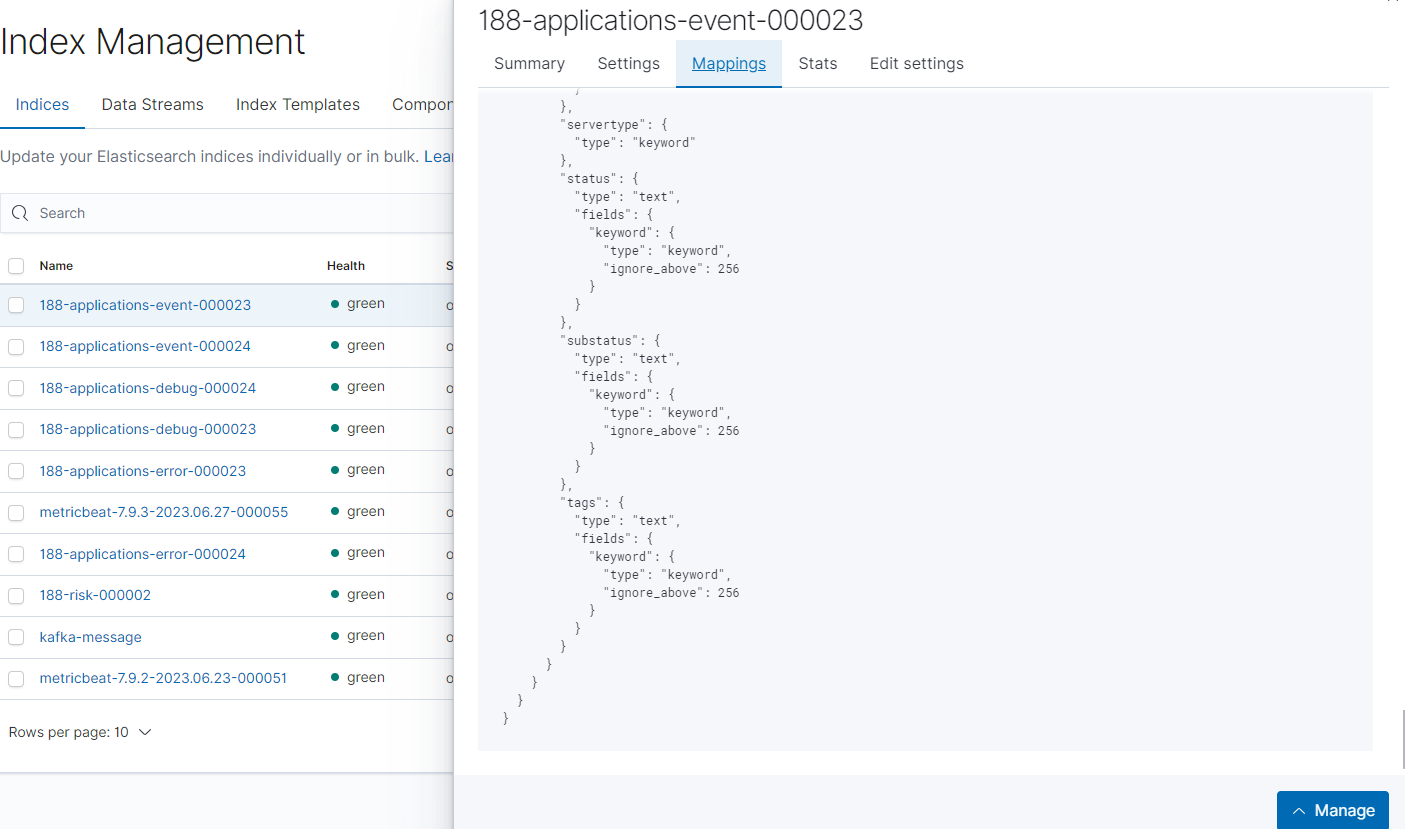
系統中使用的 ELK Index 依功能分為 Application Log、Server Log 與 System Monitor 三大類:
Application Log
| Index | 說明 |
|---|---|
applications-error-* |
JS 或 Application 層的 Error Log |
applications-event-* |
系統功能、下注等業務事件 Log |
applications-message-* |
打到 Event Bus(RabbitMQ)的訊息 Log,依 Topic 分類 |
applications-performance-* |
Application 層效能 Log |
applications-request-* |
Application 層 Request Log |
applications-statics-* |
已棄用(原用於收集 LiveChat 來源 SHP 資訊) |
applications-debug-* |
Debug 用途,理論上不應長期存放於 ELK |
Server & Risk Log
| Index | 說明 |
|---|---|
servers-weblog-* |
IIS / Jetty / 其他 WebServer 的存取日誌 |
risk-agilecheck-* |
收集 AgileCheck 呼叫 iOvation 驗證會員合法登入的記錄 |
System Monitor
| Index | 說明 |
|---|---|
metricbeat-* |
Redis、Disk、Memory、CPU 等系統監控指標 |
sys-proxysg* |
查詢透過 Proxy Server 對外發出的 Request |
flowchart TD
    App["Application Layer"]
    App --> AE["applications-error-*
錯誤日誌"]
    App --> AEV["applications-event-*
業務事件"]
    App --> AM["applications-message-*
MQ 訊息"]
    App --> AP["applications-performance-*
效能日誌"]
    App --> AR["applications-request-*
請求日誌"]

    Srv["Server Layer"]
    Srv --> WL["servers-weblog-*
WebServer 日誌"]
    Srv --> RA["risk-agilecheck-*
iOvation 驗證"]

    Sys["System Monitor"]
    Sys --> MB["metricbeat-*
Redis/系統指標"]
    Sys --> PX["sys-proxysg*
Proxy 請求"]
Kibana Index Management
Elasticsearch Field Type 介紹
理解 Field Type 對查詢效能與行為有直接影響:
| Field Type | 說明 |
|---|---|
text |
全文搜尋用,不能用於 Aggregation,可搜尋片段字元 |
keyword |
精確值搜尋與 Aggregation 用,搜尋必須完整符合(預設長度 256) |
date |
時間戳記欄位 |
ip |
IP 位址格式 |
geo_point |
地圖用,儲存經緯度 |
long |
整數 |
boolean |
布林值 |
float |
浮點數 |
_index |
Document 所屬 Index 名稱(meta field) |
_type |
Document 類型(meta field,新版已棄用) |
_id |
Document ID(meta field) |
_source |
Document 原始 JSON 資料(meta field) |
_version |
版本號,每次更新會遞增(meta field) |
重要:排序(Sort)和聚合(Aggregation)必須使用
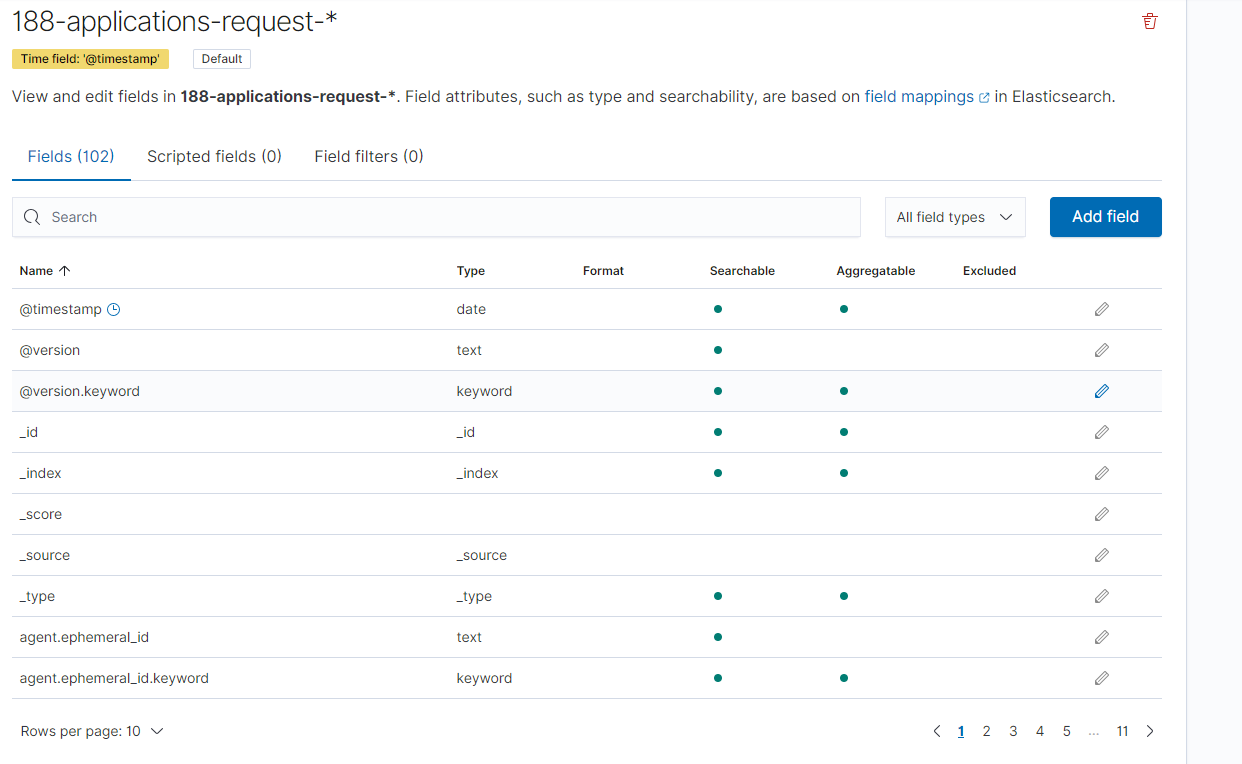
keyword欄位;全文搜尋用text。同一個欄位通常會同時有field和field.keyword兩種型態。
Field Mapping 實際畫面
Common Field 各 Log 共用欄位
所有 Index 共享以下基礎欄位,方便跨 Index 交叉查詢:
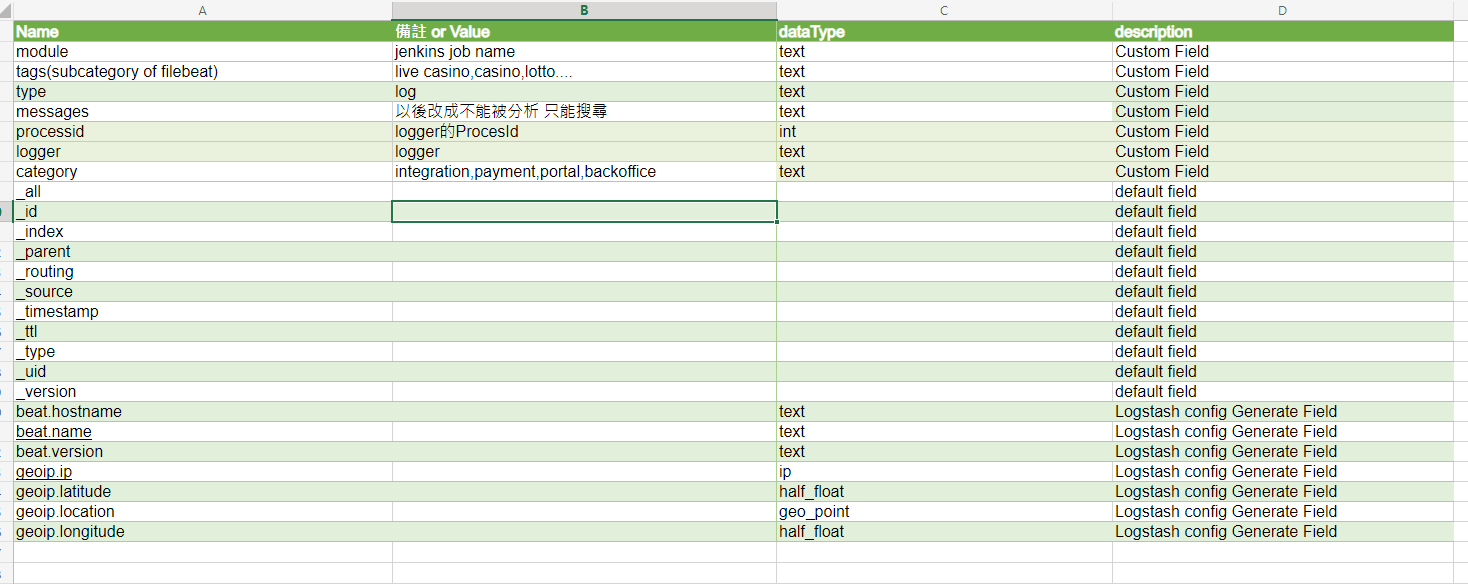
| 欄位 | 欄位名稱 | 型態 | 說明 |
|---|---|---|---|
| module | module |
Custom Field | 服務/站台名稱,例如 web.star4 |
| tags/category | tags/category |
Custom Field | 功能分類,例如 frontend、integration |
| processed | processed (loggedOrProcessed) |
bit | 是否已被處理 |
| logger | logger |
Custom Field | Logger 類別名稱 |
| category | category |
Custom Field | 整合分類(payment backoffice 等) |
| host.hostname | host.hostname |
Custom Field | 主機名稱 |
| host.location | host.location |
Custom Field | 機房位置 |
| geo.ip | geo.ip |
Custom Field | 地理位置 IP |
| geo.longitude | geo.longitude |
geo_float | 經緯度 |
Log Pattern 格式解析
各類型 Log 在寫入 ELK 前都會依照固定的 Pattern 格式化,配合 log4net 的通用前綴:
1 | %date [%thread] [%level] [%logger] |

Application Log Pattern
| Log 類型 | Pattern 格式 |
|---|---|
| Request Log | [REQUEST][Method|requestUrl][HTTPMethod][clientIP][sessionId][memberCode][refererURL|MobileAppVersion] Message |
| Event Log | [EVENT][event][status][subStatus][identity] Message |
| Performance Log | [Performance][Method][Time] |
| Error Log | [ERROR] Msg |
| Message Log | [MESSAGES][guid][worker][topic][queuename][action] Message |
Server Log Pattern
| Log 類型 / Server | Pattern 格式 |
|---|---|
| WebLog(IIS) | date httpmethod method querystring port sourceuseragent refererurl hostname statuscode substatuscode responsetime |
| WebLog(Jetty) | clientip - - [date] "httpmethod method protocol" statuscode responsesize "refererurl" "sourceuseragent" - responsetime |
Risk Log Pattern
| Log 類型 | Pattern 格式 |
|---|---|
| AgileCheck | [Risk][Brand][Membercode][DeviceId][Result][{"deviceId":"...","reason":"..."}] Message |
| Suspect | [Risk][Brand][Membercode][IpAddress][Event][Result] Message |
效能問題排查
General Check — 快速定位慢 API
使用情境:檢查哪些 API 的回應時間偏高。
查詢索引:
applications-performance-*— Application 內部計時servers-weblog-*— WebServer 層計時(API 通常以/service/開頭)
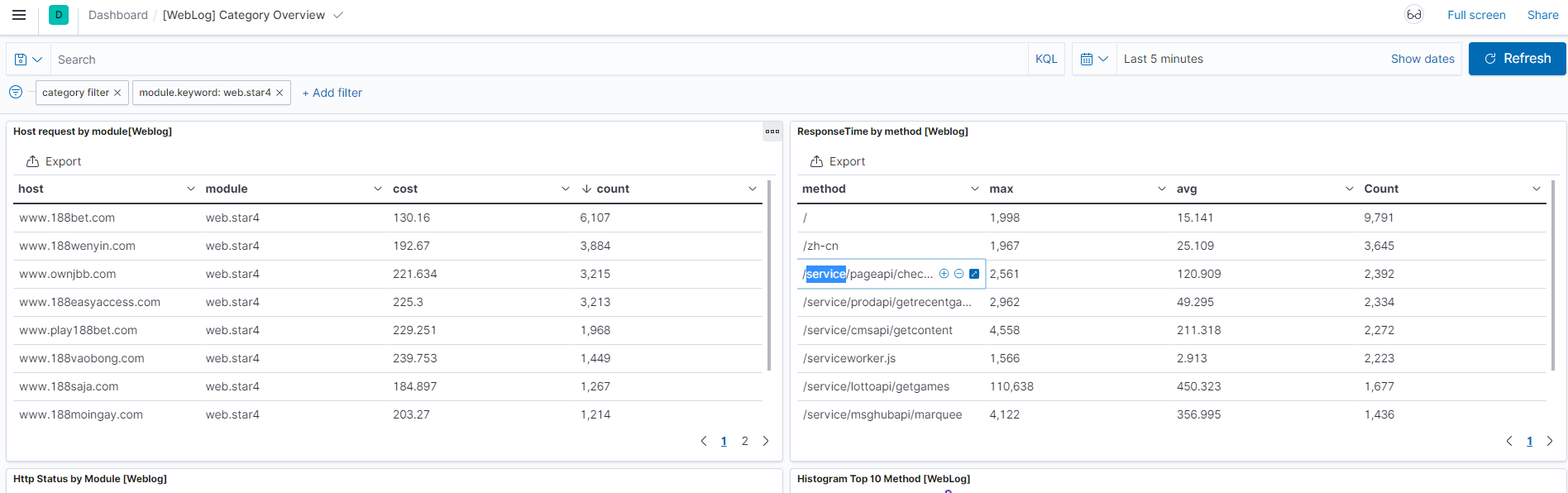
查詢思路:
- 先從
servers-weblog-*找出整體哪個 host / module 請求量最高 - 搭配 Response Time 排序,找出最慢的前幾支 API
- 再進入
applications-performance-*做 Drill Down
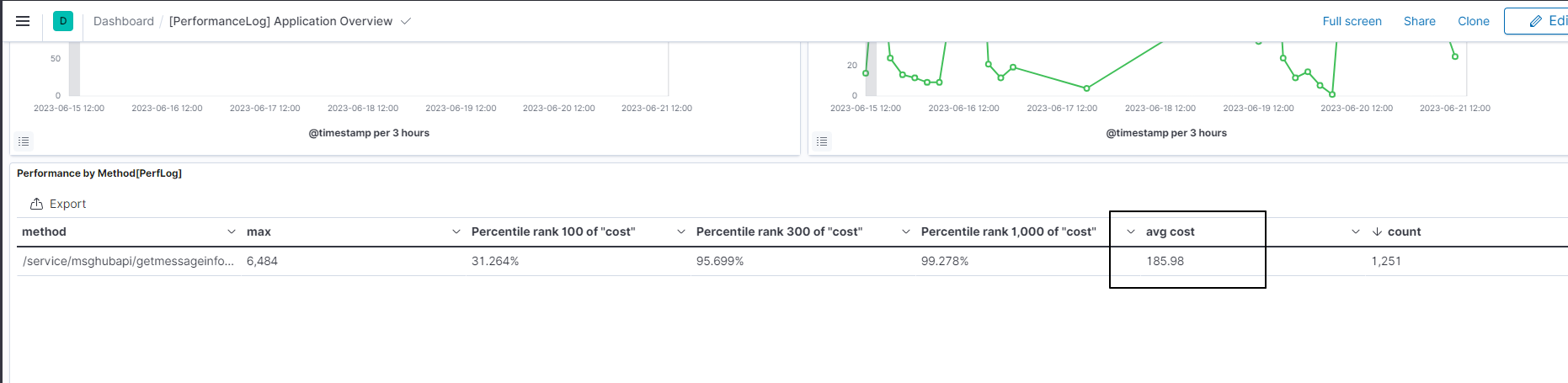
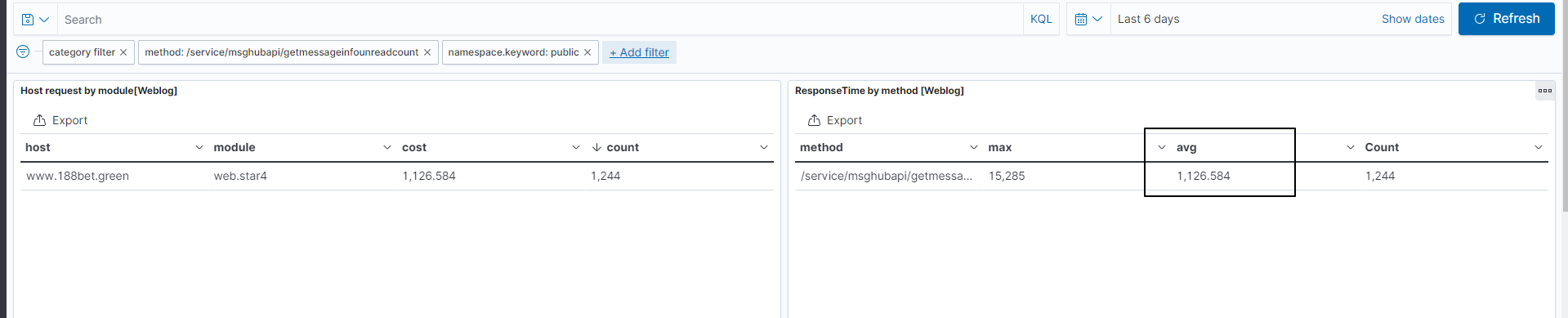
Specified API Check — 深入分析單一慢 API
當鎖定特定 API 後,透過雙 Index 對照找出瓶頸所在:
1 | 查詢順序: |
若 WebServer 慢但 Application 快 → 瓶頸在網路 / WebServer 吞吐量
若 Application 本身就慢 → 瓶頸在程式邏輯或依賴服務
Application Performance Log:
WebLog 對照:
Request Log 查詢
主要使用情境
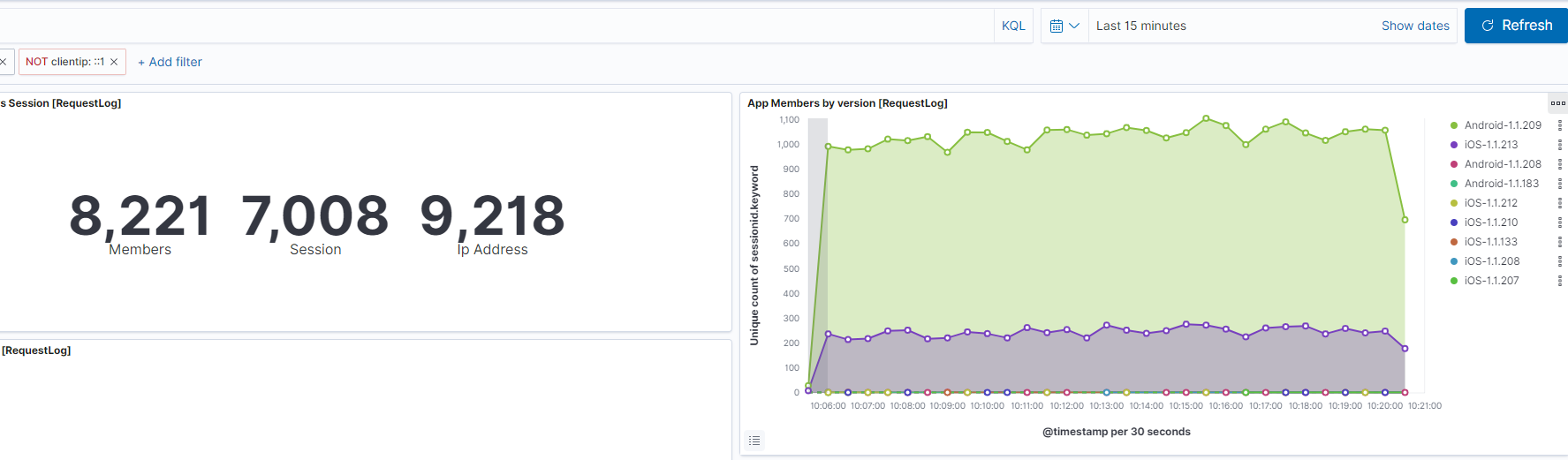
- Mobile App 版本分佈監控
- Internal Request 追蹤(Logger:
HttpWebRequest) - 用戶行為稽核(Session、IP、Input Data)
索引:applications-request-*
Mobile App 版本監控
在 MobileAppSpi 的 Request Log 中,refererurl 欄位記錄了 device + version 資訊。
常見用途:
- App 更新後追蹤新版本的覆蓋速度
- 計算仍未更新的會員比例
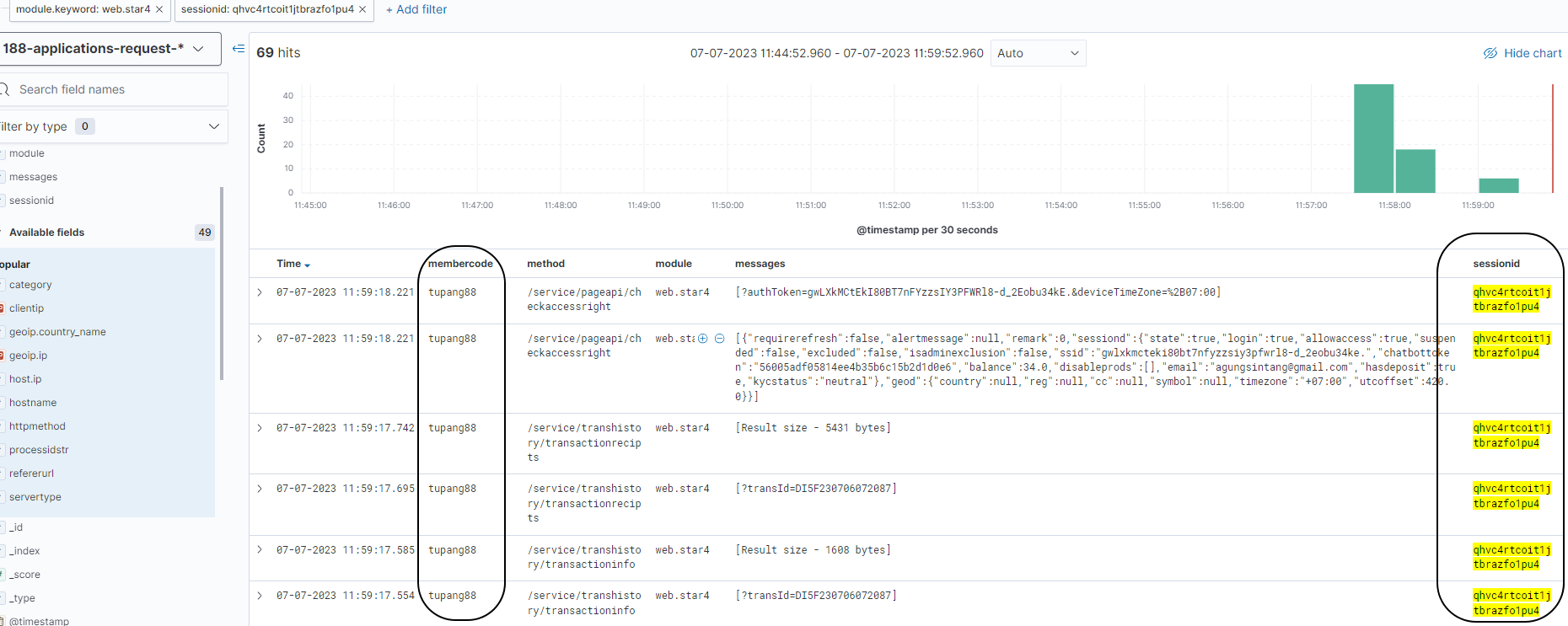
會員行為追蹤(Request + Event 交叉查詢)
查詢索引:
applications-request-*applications-event-*
查詢策略:以 sessionId、memberCode、clientIP 三個維度交叉比對,必要時加入 IP 縮小範圍。
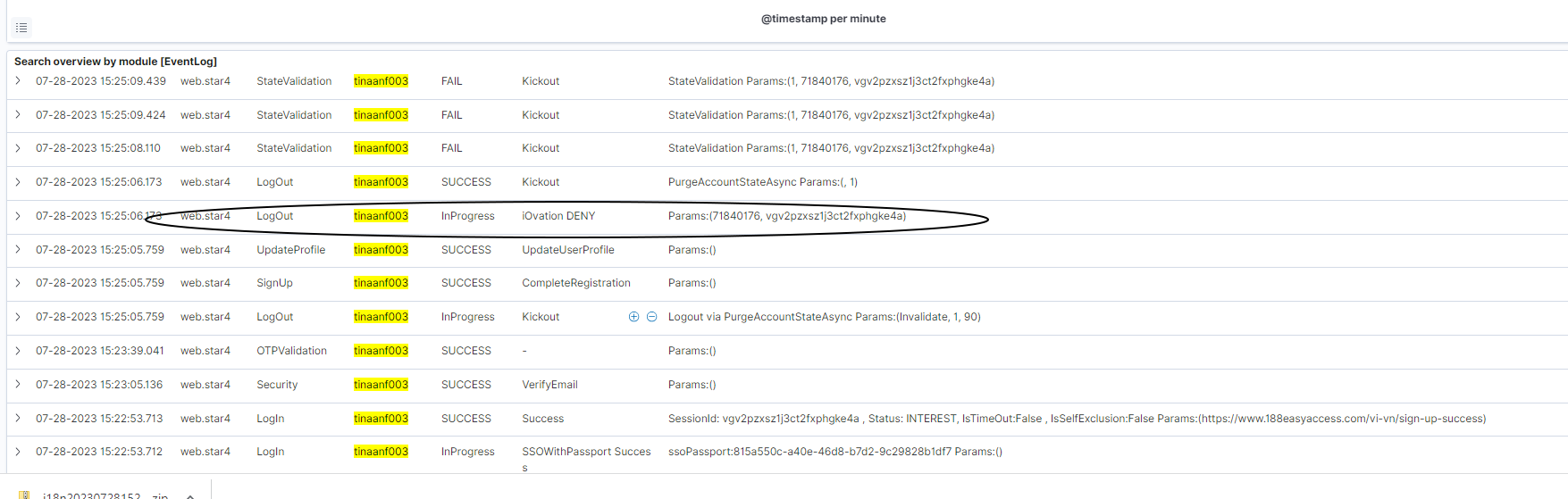
iOvation 封鎖調查
當會員反映登入異常,可透過以下兩個 Index 交叉確認 iOvation 驗證結果:
Step 1 — Event Log 確認 Login 事件序列:
依 memberCode 查詢 Event Log 中的 Login 事件,確認事件狀態(SUCCESS / FAIL)與 subStatus。
Step 2 — AgileCheck Log 確認 iOvation 結果:

| 欄位 | 說明 |
|---|---|
membercode |
會員代號 |
result |
ALLOW / DENY / BYPASS |
ioResponse.reason |
DENY 原因,例如 2 Accounts per device in 15 minutes |
geoip.country_name |
來源國家 |
deviceid |
設備識別碼 |
Error Log 查詢
索引:applications-error-*
常見 Logger 說明
| Logger | 說明 |
|---|---|
LoggerController |
Client Side 錯誤,或 Client 主動呼叫 Error Log API |
Global |
Request 層最底層 Catch 到的 Exception,含路徑 / IP 資訊 |
Utility |
通常是 CDN 檔案缺少或 Parsing 失敗(可能寫入 Warning Log) |
AccountStateManager |
會員 Session 遺失時觸發,將會員 Kick Out |
Case Study:用戶登入後顯示 403 Forbidden
UTIM-9867:用戶回報在某時間點後登入 App 持續出現 403 Forbidden 頁面
排查步驟:
先從 Error Log 與 WebLog 確認問題發生時間與錯誤訊息:
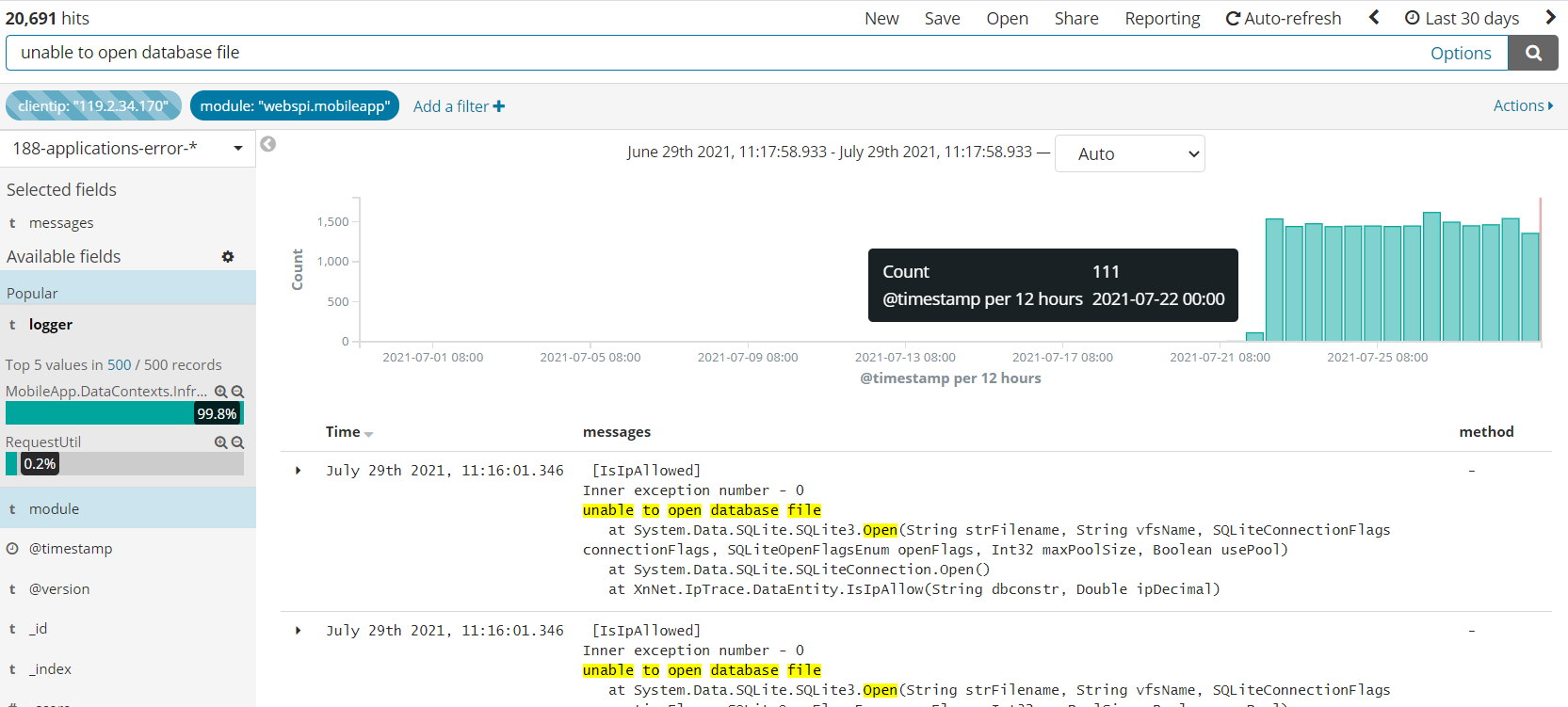
從圖中可以看到:
- 錯誤訊息:
unable to open database file - 時間集中在特定區間,呈爆量模式
- 透過 Logger 與 Module 可進一步縮小影響範圍
Chatbot Log 查詢
Chatbot Error Log
索引:applications-error-*

透過 module 欄位篩選 webspi.chatbot,可找出 Chatbot 呼叫下游服務失敗的詳細錯誤訊息與對應 API。
Chatbot Event Log
索引:applications-event-*
Chatbot 相關的 Event 類型:
| Event | 說明 |
|---|---|
TokenValidation |
驗證 Token 合法性 |
Greeting |
歡迎訊息觸發 |
FetchData |
向後端取資料 |
FetchDataFromProvider |
向 Provider 取資料 |
HandOffToSF |
轉接 Salesforce 客服 |
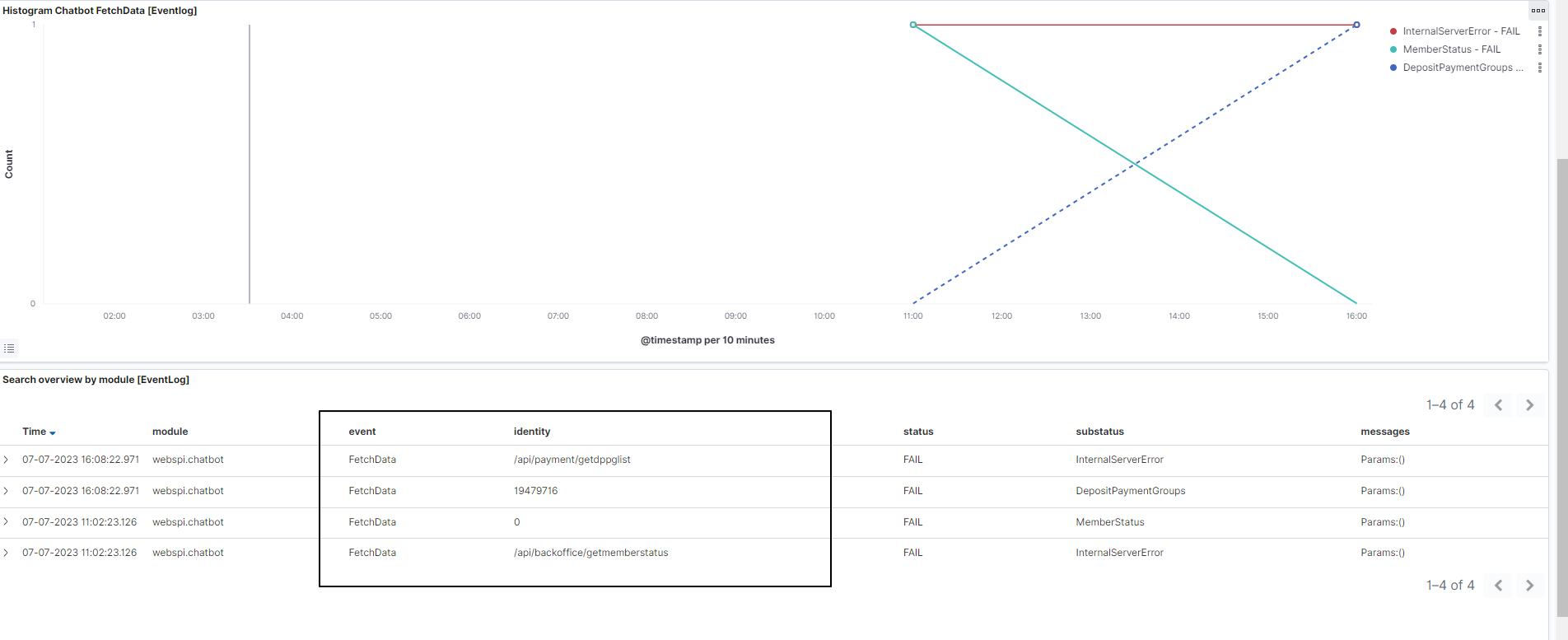
透過 Histogram 可觀察各事件的數量交叉趨勢,例如 FetchDataFromProvider 失敗率上升時,HandOffToSF 通常也會隨之增加。
Message Log(RabbitMQ)
索引:applications-message-*

查詢重點:
- 確認某 Topic 是否有被成功觸發
- 確認對應的 Action 是否有被執行
注意:在 QAT RED 環境下,RabbitMQ Queue 可能是共用的,相同 Topic 的訊息有可能被其他環境的 Event SPI 消費,排查時需特別注意。
系統資源監控(Metricbeat)
Redis 使用量監控
索引:metricbeat-*
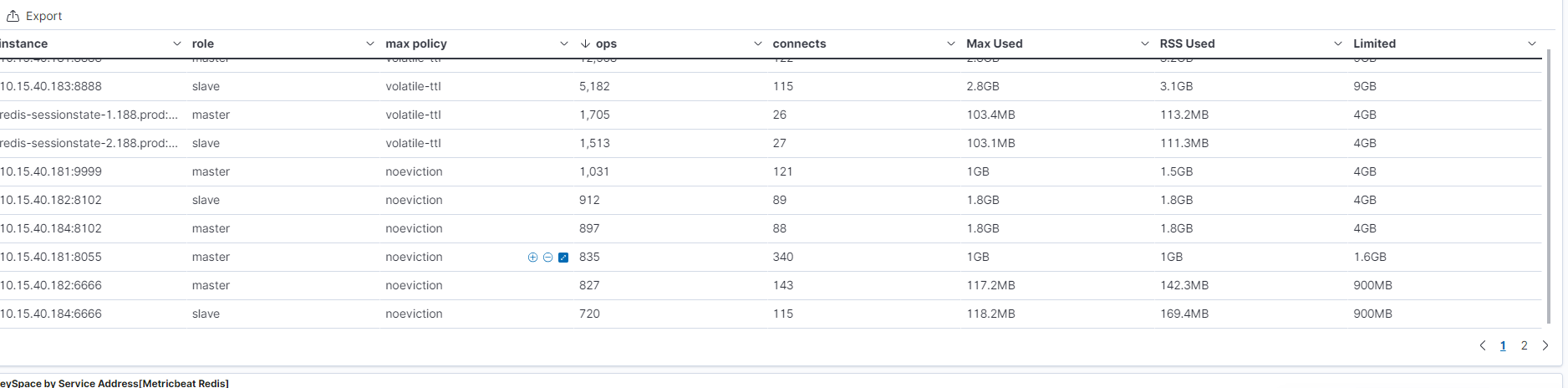
| 監控維度 | 說明 |
|---|---|
| Max Memory | Redis 最大可用記憶體設定 |
| RSS Used | 實際佔用的 OS 記憶體 |
| Max Used | 歷史峰值 |
| Connections | 目前連線數 |
| Limited | 是否觸碰上限 |
系統資源監控
索引:metricbeat-*
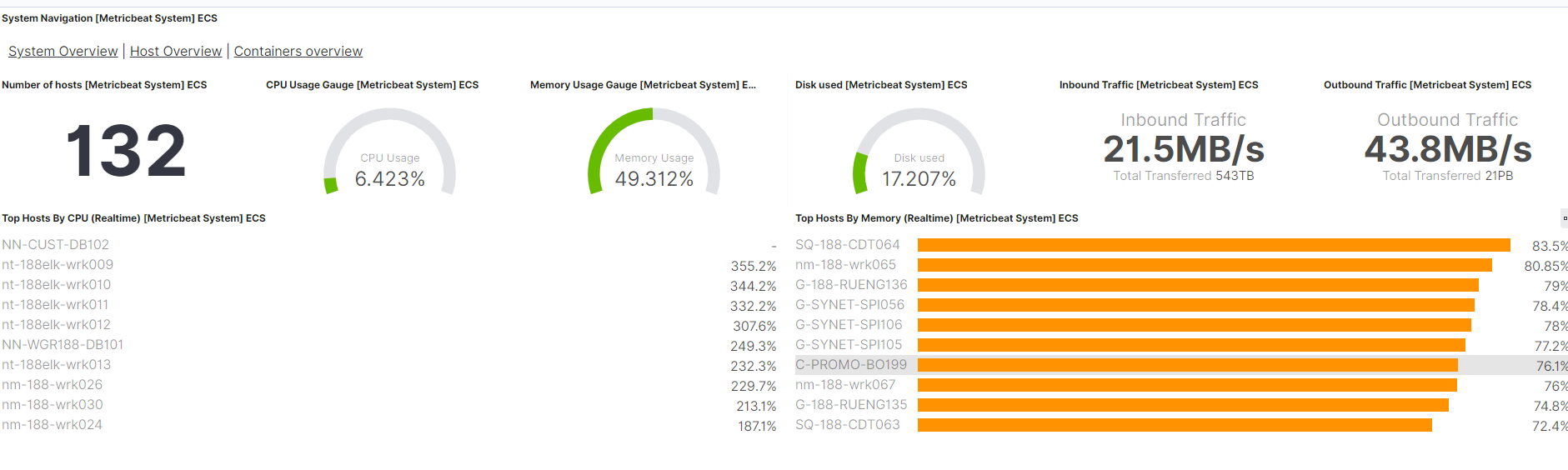
可監控指標:
- CPU 使用率 — 各核心與整體平均
- Memory 使用率 — 已用 / 可用
- Disk Space — 各掛載點容量
- Network I/O — Inbound / Outbound Traffic
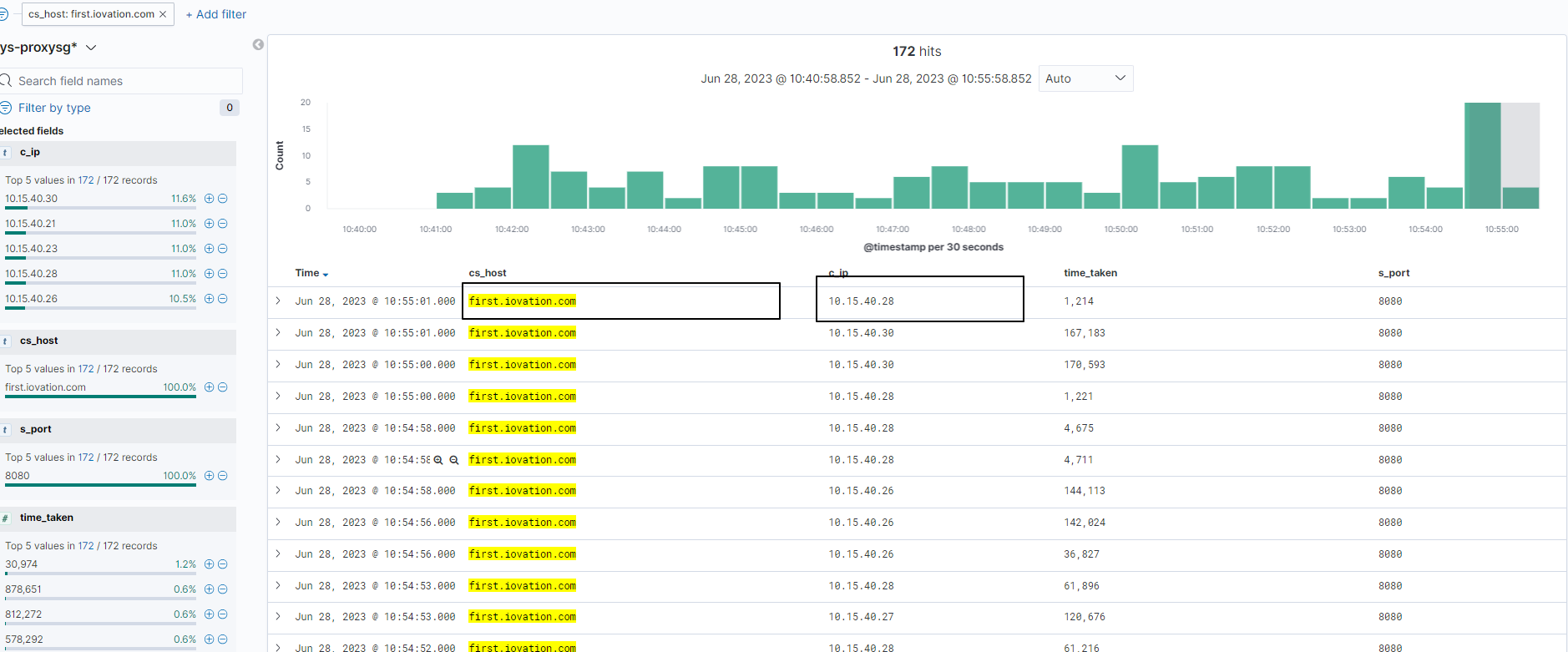
Proxy Server 查詢
索引:sys-proxysg*
使用情境:確認系統透過 Proxy Server 對外連線某 Domain 是否成功。
| 欄位 | 說明 |
|---|---|
cs_host |
對外連線的 Domain |
c_ip |
發出請求的 Server IP |
進階查詢技巧
Match Phrase 搜尋 Message 欄位中的特定值
當需要在 messages 欄位中搜尋含有特殊字元的字串時(例如 JSON 中的 key),使用 match_phrase 並正確 Escape:
1 | { |
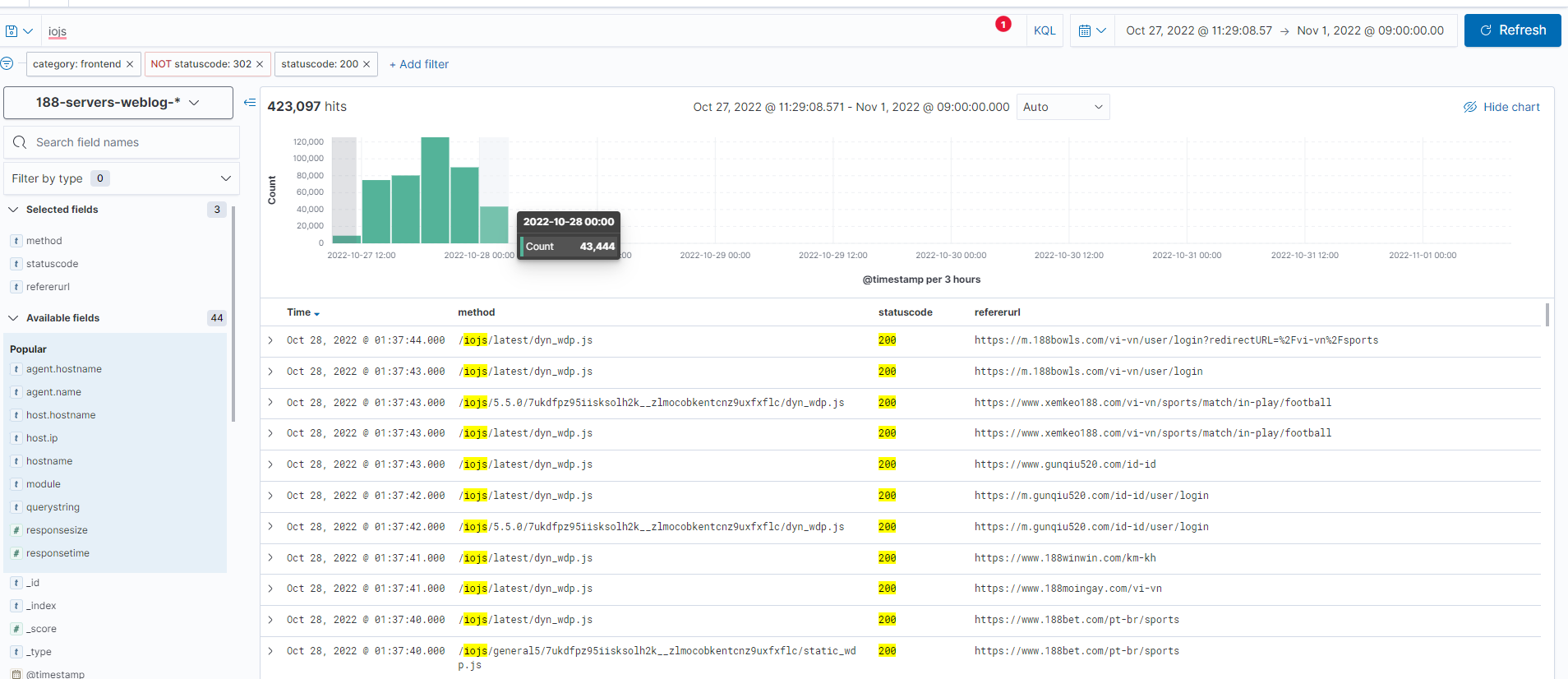
Case Study:iOvation Script 返回 404
PIM-26559:iOvation JS Script 返回 404,影響設備驗證功能
索引:servers-weblog-*
排查思路:由於 Reverse Proxy 所有對外回應都會先經過 WebServer,即使是 JS 靜態資源也不例外,因此可透過 WebLog 鎖定:
- 404 錯誤第一次發生的時間點
- 對應的 URL 路徑
- 受影響的請求量
TimeLion 進階:跨 Index 效能比對
TimeLion 是 Kibana 中的時序分析工具,支援在同一張圖中疊加多個 Index 的指標:
1 | .es( |
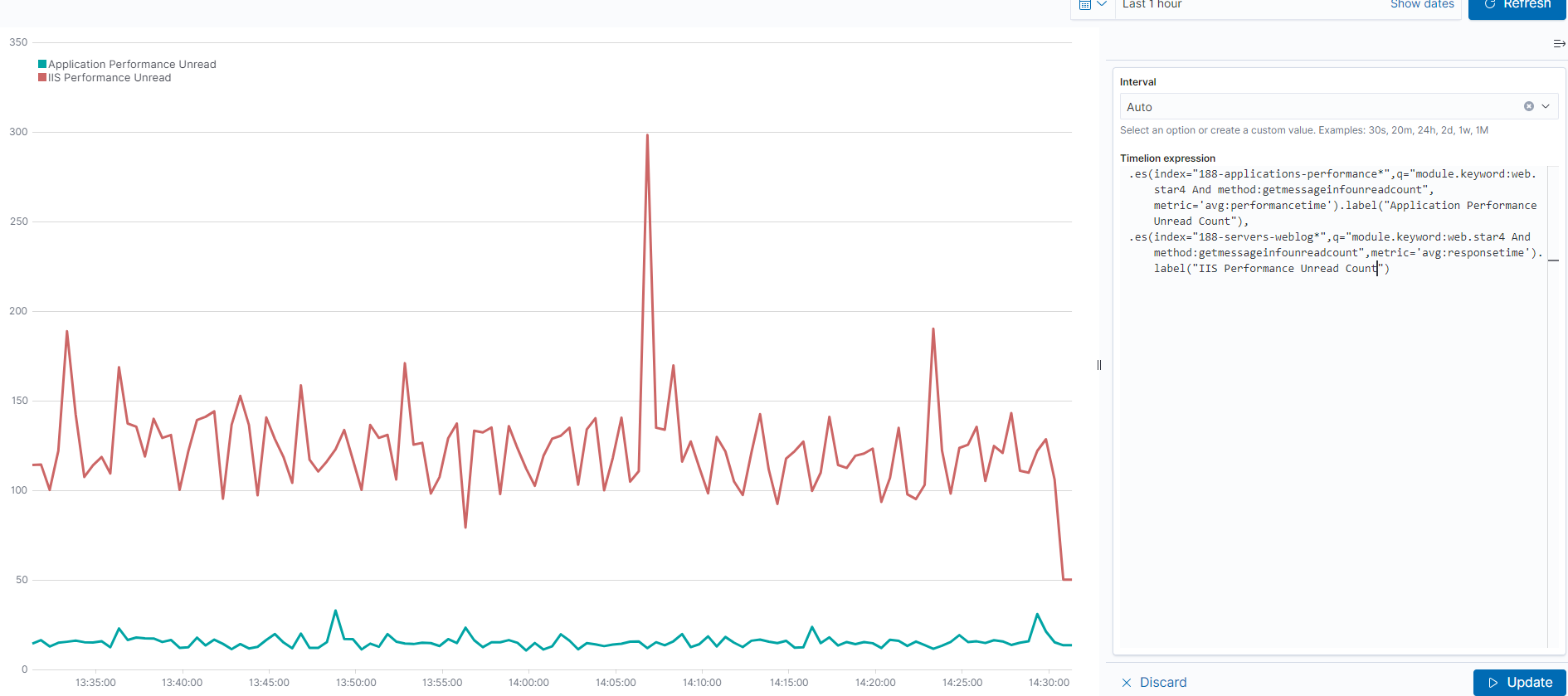
解讀方式:
- 若兩條線幾乎重疊 → Application 本身就慢,與 WebServer 吞吐量無關
- 若 IIS 線明顯高於 Application 線 → WebServer 層有排隊或吞吐量瓶頸
- 若出現尖峰只在 IIS → 可能是連線數爆量、Keep-Alive 問題等
查詢情境速查表
| 問題情境 | 建議 Index | 關鍵欄位 |
|---|---|---|
| API 整體效能異常 | servers-weblog-* |
module、responsetime |
| 特定 API 慢 | applications-performance-* |
method、performancetime |
| 用戶操作流程追蹤 | applications-request-* + applications-event-* |
memberCode、sessionId、clientIP |
| iOvation 封鎖查詢 | risk-agilecheck-* |
membercode、result、ioResponse.reason |
| 錯誤根因分析 | applications-error-* |
logger、module、messages |
| MQ 訊息是否送達 | applications-message-* |
topic、action、queuename |
| Redis 記憶體用量 | metricbeat-* |
redis.info.memory.used.rss |
| 對外 Proxy 連線 | sys-proxysg* |
cs_host、c_ip |