前言
前端開發中最難追蹤的不是語法錯誤,而是那些只在特定操作流程下才會出現的邏輯錯誤。使用者通常無法準確描述發生了什麼,如果沒有錯誤記錄機制,等於瞎子摸象。
本文分享我們從基礎版 Vue Error Handler演進到生產級 Exception Handler 架構的完整過程,涵蓋 Vue 元件錯誤捕捉、Pinia Store Action 錯誤攔截、錯誤去重、自動重試、Source Map 還原等實戰經驗。
前端錯誤的四種類型
| 類型 | 說明 | 偵測方式 |
|---|---|---|
| Syntax Error | Template 中的語法錯誤(多餘 TAG、未關閉標籤) | ESLint / IDE Extension / Pre-commit |
| Runtime Error | 執行階段錯誤(缺少引用的元件等) | IDE Extension / 開發環境即時提示 |
| Logical Error | 邏輯錯誤,最難被測試發現 | 需要錯誤記錄機制主動捕捉 |
| API Error | Server Side 錯誤,通常有 Request Log 可追蹤 | IIS Log / Jetty Log / HTTP Status |
其中 Logical Error 是最棘手的——它不會讓頁面直接崩潰,但會導致功能行為不符預期。接下來的架構就是為了解決這個問題。
Part 1:基礎版 — Vue Error Handler
Vue 全域 Error Handler
Vue 提供了 app.config.errorHandler,可以集中捕捉所有未被 try-catch 處理的元件錯誤,統一送到後端記錄:
1 | function sendErrorLogRequest(logData) { |
Vue Lifecycle Hook — errorCaptured
除了全域 handler,也可以透過各元件的 errorCaptured lifecycle hook 攔截錯誤,適合需要在特定元件做局部處理的場景:
1 | export default { |
實際排錯流程:用 Source Map 還原壓縮後的錯誤
生產環境的 JS 經過壓縮混淆,Stack Trace 會變成這樣:
1 | chunk-vendors.f74a5e6c.js:1 SyntaxError: Unexpected token D in JSON at position 0 |
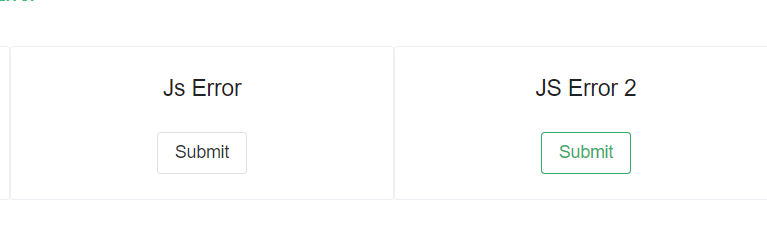
後端收到錯誤 Log 後:

透過 source-map-cli 還原壓縮前的程式碼位置:
1 | source-map resolve validate.9cc0683f.js.map 1 51528 |
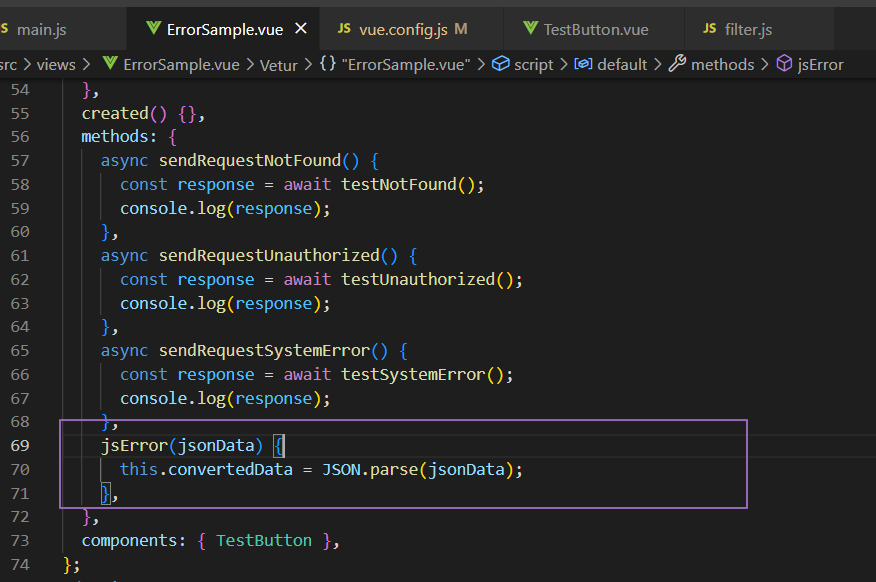
即使使用者無法準確描述問題,也能透過 Log 系統反推出錯的位置和上下文:

Part 2:生產級 — Exception Handler 架構
基礎版在小型專案中夠用,但在高流量的生產環境中,我們遇到了幾個具體問題:
- 重複轟炸:一個
render函式裡的錯誤,每次 re-render 都觸發一次,一秒可能送幾百次,打爆 log server 或觸發 WAF 限流。 - 網路失敗靜默丟棄:斷線重連後的第一個錯誤永遠送不到。
- 記憶體不受控:如果用
Set記錄「已送的錯誤 ID」但從不清理,長時間運行的 SPA 會持續累積。 - payload 過大:某些框架的 stack trace 超過 10 萬字元,HTTP body 過大會被 nginx 或 WAF 拒絕(413 Payload Too Large)。
- handler 本身崩潰:
window.onerror裡面的fetch如果因為環境問題拋出例外,整個 handler 失效,後續所有錯誤都不上報。
因此我們設計了進階版的 exceptionHandler,完整架構如下:
flowchart TD
    subgraph entry [錯誤進入點]
        VueError["Vue Component Error
app.config.errorHandler"]
        PiniaError["Pinia Action Error
store.$onAction onError"]
        ManualError["手動呼叫
exceptionHandler"]
    end
    subgraph handler [exceptionHandler 核心流程]
        Dedup["重複檢測
SHA256 errorId + debounce"]
        Payload["建立 Error Payload
stack, message, cause,
userAgent, memberCode"]
        SizeCheck["Payload 大小檢查
上限 10000 chars"]
        Submit["送出 Error Log
fetch POST + retry"]
    end
    subgraph backend [後端]
        LoggerAPI["Logger API
/service/loggerApi/exception"]
    end
    VueError --> Dedup
    PiniaError --> Dedup
    ManualError --> Dedup
    Dedup -->|新錯誤| Payload
    Dedup -->|"重複錯誤 3s 內"| Skip["跳過"]
    Payload --> SizeCheck
    SizeCheck --> Submit
    Submit -->|POST| LoggerAPI
    Submit -->|失敗| Retry["指數退避重試
最多 3 次"]
    Retry --> Submit
進入點 1:Vue 全域錯誤處理
1 | // packages/star4/src/main.ts |
Vue 會將所有未被 try-catch 捕捉的元件錯誤交給此 handler,包含:
- Template render 錯誤
setup()/mounted()/updated()等 lifecycle hook 錯誤- Event handler(
@click等)錯誤 watchcallback 錯誤
進入點 2:Pinia Store Action 錯誤
1 | // packages/common/stores/pinia.ts |
透過 Pinia Plugin 的 $onAction hook 攔截所有 Store Action 錯誤,info 參數會帶入 Pinia action: ${actionName} 供後端識別錯誤來源。
進入點 3:原生 JS 與 Promise 錯誤
1 | // main.ts |
三個掛載點的覆蓋範圍:
| 掛載點 | 捕捉範圍 |
|---|---|
app.config.errorHandler |
Vue 組件樹內的同步錯誤、生命週期錯誤 |
window.onerror |
全局同步錯誤、setTimeout/setInterval callback |
unhandledrejection |
async/await、Promise.then/catch 中的錯誤 |
錯誤去重機制
高流量下同一個錯誤可能在幾秒內被觸發上百次,不做去重會灌爆 Log API:
flowchart LR
    A["新錯誤進入"] --> B["清理過期記錄
超過 3 秒"]
    B --> C["產生 errorId
SHA256"]
    C --> D{"sentErrors
已存在?"}
    D -->|"存在且 3s 內"| E["跳過送出"]
    D -->|"不存在或已過期"| F["檢查 Map 大小
上限 15 筆"]
    F --> G["記錄 errorId + timestamp"]
    G --> H["建立 Payload"]
為什麼用 SHA256 而不是比對 message 字串
最直覺的去重只比對 error.message,但不同的 bug 可能有相同的訊息(例如 TypeError: Cannot read properties of undefined),導致第二個錯誤被誤判為重複。這份實作的去重 key 包含四個維度:
1 | const errorData = { |
stack.slice(0, 200) 的設計考量:只取「最核心的調用棧頭部」——哪個函式拋出了錯誤——這部分是穩定的。完整的 stack 作為 payload 上報,但不作為去重 key,因為不同環境下 source map 解析或行號可能有細微差異。
秒級時間戳的作用:將同一秒內的相同錯誤歸為一組(不重複上報),但超過 DEBOUNCE_DELAY(3 秒)後,同類錯誤可以重新上報,讓間歇性錯誤在下一個時間窗口仍能被記錄。
懶清理(Lazy Cleanup)
相較於 setInterval 定時清理,懶清理(每次新錯誤進來時才掃描)不會在頁面空閒時浪費 CPU,也不存在清理間隔過長導致記憶體失控的問題:
1 | const sentErrors = new Map<string, number>(); // errorId → 上報時間 (ms) |
Map 超過上限時用 FIFO 淘汰最舊的記錄(Map 保證 insertion-order iteration,keys().next().value 永遠是最早插入的 key):
1 | function enforceMaxStoredErrors(): void { |
| 常數 | 值 | 說明 |
|---|---|---|
DEBOUNCE_DELAY |
3000ms | 相同錯誤在此時間內不重複送出 |
MAX_STORED_ERRORS |
15 | Map 最大存放數量,超過移除最舊 |
MAX_ERROR_SIZE |
10000 字元 | 超過會截斷 stack trace |
Error Payload 結構
1 | { |
getCause:Vue context 的安全讀取
1 | function getCause(vm?: any, info?: string): string { |
存取 vm.$el 可能在組件 unmount 後拋出例外(某些 Vue 版本的 timing 問題),整個 getCause 包在 try/catch 裡確保不中斷主流程。
cause 欄位的組成邏輯:
| 條件 | cause 內容 |
|---|---|
vm.$el 存在(Vue 元件) |
Path is /xxx, Error in {info} with element div.class-name |
vm.type 存在(Pinia action) |
Path is /xxx, Error in action: {type} |
僅有 info |
Path is /xxx, Info is {info} |
| 都無 | Path is /xxx |
Payload 大小控制
1 | const MAX_ERROR_SIZE = 10000; |
只截斷 stack 而非整個 payload:message、memberCode、cause 是排查問題最關鍵的欄位,即使 stack 很長也要保留完整。stack 的核心資訊在前 1,000 字元,截斷後仍能定位問題。
送出與重試機制
網路不穩時,錯誤 Log 不能直接丟棄。我們採用指數退避重試:
sequenceDiagram
    participant H as exceptionHandler
    participant API as Logger API
    H->>API: POST attempt 1
    alt 成功
        API-->>H: 200 OK
    else 失敗
        Note over H: 等待 1s
        H->>API: POST attempt 2
        alt 失敗
            Note over H: 等待 2s
            H->>API: POST attempt 3
            alt 失敗
                Note over H: 等待 4s
                H->>API: POST attempt 4 final
            end
        end
    end
1 | const MAX_RETRY_COUNT = 3; |
| 嘗試次數 | 等待時間 |
|---|---|
| 首次 | 0ms |
| Retry 1 | 1s |
| Retry 2 | 2s |
| Retry 3 | 4s |
| 設定 | 值 | 說明 |
|---|---|---|
MAX_RETRY_COUNT |
3 | 最多重試 3 次(含首次共 4 次) |
| 退避策略 | 2^retryCount * 1000ms |
指數退避,上限 10s |
| Timeout | 10000ms | 每次 fetch 的 AbortSignal timeout |
| 離線檢測 | navigator.onLine |
離線時直接跳過 |
API 端點
1 | POST {origin}/service/loggerApi/exception |
設計決策對比總結
| 問題 | 常見做法 | 本實作 |
|---|---|---|
| 錯誤來源 | Vue 元件 | Vue 元件 + Pinia Action + window.onerror + unhandledrejection |
| 重複上報 | 無處理 | SHA256 去重 + 3s debounce |
| 去重 key | error.message |
message + stack[:200] + pathname + 秒戳 |
| 記憶體管理 | 無清理或定時清理 | 懶清理 + 15 筆 FIFO 硬上限 |
| 網路失敗 | 丟棄 | Exponential Backoff,最多 retry 3 次 |
| Payload 過大 | 完整上報 | 超 10000 字元截斷 stack |
| 離線場景 | fetch 失敗進 retry | 先 check navigator.onLine |
| Handler 崩潰 | 整個機制失效 | 外層 try/catch 保護 |
| 超時 | 無限等待 | AbortSignal.timeout(10s) |