前言 在生產環境中,很多問題不會立即被人發現——部署後新版本的 Error Log 悄悄飆升、第三方 Provider 突然故障導致遊戲啟動連續失敗、甚至遭受攻擊產生大量 Security 事件。如果只靠人工盯 Kibana Dashboard,往往等到使用者回報時已經影響了大量用戶。
本文分享我們實際部署的 五個 Elasticsearch Watcher 告警規則,涵蓋:
一般事件失敗率 (Main Event)— 涵蓋所有業務事件的失敗率異常Security 事件失敗率 — 安全相關事件的集中監控事件成長率比較 (15 分鐘比對)— 偵測事件失敗是否突然飆升Game Launch 失敗率 — 遊戲啟動成功率的精確監控Error Log 成長率 — 部署後 Bug 或攻擊導致的錯誤暴增偵測
透過定時查詢 + 條件判斷 + 自動寄信,讓團隊在問題擴大前就能收到通知並介入處理。
Log 格式與索引設計 在介紹 Watcher 之前,先說明我們的 Log 結構,這是告警規則能精確命中問題的基礎。
Event Log(業務事件) 索引:applications-event*
格式:[EVENT][event][status][subStatus][identity] Message
欄位
說明
範例
category產品類別
frontend
module模組/產品名稱
sportsbook、casino
event事件類型
TokenAssignment、LogIn
status結果狀態
SUCCESS、FAIL
substatus子狀態 / Provider
PartnerA、PartnerB
Error Log(錯誤日誌) 索引:applications-error*
格式:[ERROR] Message
欄位
說明
範例
category產品類別
frontend
module模組名稱
sportsbook
loggerLogger 類別名稱
GameService.LaunchHandler
完整 Event 清單與告警門檻 以下是系統中所有業務事件類型,以及各事件建議的失敗率告警門檻:
身份驗證 / 帳戶類
Event 名稱
說明
建議告警門檻
LogIn用戶登入
50%
LogOut用戶登出
— (通常不監控)
SignUp用戶註冊
90%
UpdateProfile更新個人資料
10%
Security安全性事件
5% (獨立 Watcher)
驗證類
Event 名稱
說明
建議告警門檻
OTPValidationOTP 驗證
20%
TokenValidationToken 驗證
90%
CaptchaValidation圖形驗證碼
20%
StateValidation狀態驗證
— (已知噪音,排除)
Debugger除錯事件
—
遊戲啟動類
Event 名稱
說明
建議告警門檻
TokenAssignment遊戲 Token 分配(Game Launch)
30% (獨立 Watcher)
金融交易類
Event 名稱
說明
建議告警門檻
DepositSubmission存款提交
10%
WithdrawalSubmission提款提交
10%
BankAccountUpdate銀行帳戶更新
20%
PaymentOptionList取得付款選項清單
20%
TxnDetailSubmission交易詳情提交
20%
CancelTransaction取消交易
20%
ChangeWdDispute提款爭議處理
20%
C2CDepositProcessC2C 存款流程
20%
RemainingNumbersOfDeposit剩餘存款次數查詢
30%
通知 / 其他類
Event 名稱
說明
建議告警門檻
Affiliate聯盟會員事件
10%
Transaction一般交易事件
10%
ProductReport產品報表
20%
LaunchLiveChat啟動客服聊天
—
Notifications推播通知
20%
Expose188BankAccount銀行帳號顯示
10%
EmailNotificationSubscriptionEmail 訂閱
20%
UploadToAwsS3上傳 S3
20%
SubmitFileUpload提交文件上傳
20%
MicroInterAction微互動事件
30%
Promotion促銷活動
90%
SportsWidget運動小工具
20%
JumioJumio KYC 驗證
20%
iovationiovation 設備驗證
20%
注意 :LogOut、StateValidation 屬於已知噪音或不需告警的事件,建議在主要 Event Watcher 中使用 must_not 排除。
Watcher 運作原理 flowchart TD
A["Trigger
每個 Watcher 由五個部分組成:
元件
功能
Trigger 定時排程(每 N 分鐘執行一次)
Input 對 Elasticsearch 發送聚合查詢
Condition 用 Painless Script 判斷是否需要告警
Transform 組裝 Email 內容(HTML 表格)
Action 寄送告警信件
總覽:五個 Watcher 的分工 flowchart TD
EL["Event Log
#
Watcher 名稱
監控對象
執行頻率
告警門檻
適用場景
1
Main Event 失敗率
所有業務事件
30 分鐘
失敗率 > 5%
整體事件異常偵測
2
Security Event
Security 事件
30 分鐘
失敗率 > 5%
疑似攻擊或帳號異常
3
Event 成長率比較
所有業務事件
15 分鐘
成長率 > 5%
特定事件突然惡化
4
Game Launch 失敗率
TokenAssignment
10 分鐘
失敗率 > 30%
Provider 故障、遊戲無法啟動
5
Error Log 成長率
Error Log
15 分鐘
成長率 >= 20% 且 >= 50 筆
部署後 Bug、被攻擊
Watcher 1:Main Event 失敗率監控 監控目的 偵測所有業務事件是否出現異常失敗率。此 Watcher 是最廣泛的告警規則,以 Module → Event 兩層維度監控所有 frontend 事件,任一事件的失敗率超過 5% 即觸發告警。
排除掉 LogOut、StateValidation、Security(Security 事件由 Watcher 2 獨立處理)。
觸發條件
項目
設定
執行頻率
每 30 分鐘
查詢範圍
過去 30 分鐘的 applications-event*
篩選條件
category=frontend,排除 LogOut、StateValidation、Security
分群方式
依 module(產品)→ event(事件類型)分組
告警門檻
任一組的失敗率超過 5%
冷卻時間
30 分鐘
查詢流程 flowchart LR
A["過去 30 分鐘
Watcher 設定 1 2 3 4 5 6 7 8 9 10 11 12 13 14 15 16 17 18 19 20 21 22 23 24 25 26 27 28 29 30 31 32 33 34 35 36 37 38 39 40 41 42 43 44 45 46 47 48 49 50 51 52 53 54 55 56 57 58 59 60 61 62 63 64 65 66 67 68 69 70 71 72 73 74 75 76 77 78 79 80 81 82 83 84 85 86 87 88 89 90 91 { "trigger" : { "schedule" : { "interval" : "30m" } } , "input" : { "search" : { "request" : { "search_type" : "query_then_fetch" , "indices" : [ "applications-event*" ] , "rest_total_hits_as_int" : true , "body" : { "query" : { "bool" : { "filter" : [ { "term" : { "category" : "frontend" } } , { "range" : { "@timestamp" : { "gte" : "now-30m" } } } ] , "must_not" : [ { "terms" : { "event.keyword" : [ "LogOut" , "StateValidation" , "Security" ] } } ] } } , "size" : 0 , "aggs" : { "by_module" : { "terms" : { "field" : "module.keyword" , "size" : 10 } , "aggs" : { "by_event" : { "terms" : { "field" : "event.keyword" , "size" : 100 } , "aggs" : { "failed_status" : { "filter" : { "term" : { "status.keyword" : "FAIL" } } , "aggs" : { "failed_count" : { "value_count" : { "field" : "status.keyword" } } } } , "total_status" : { "value_count" : { "field" : "status.keyword" } } , "failure_rate" : { "bucket_script" : { "buckets_path" : { "failed" : "failed_status.failed_count" , "total" : "total_status" } , "script" : "if (params.total > 0) { return params.failed / params.total * 100 } else { return 0 }" } } } } } } } } } } } , "condition" : { "script" : { "source" : "return ctx.payload.aggregations.by_module.buckets.stream().flatMap(module -> module.by_event.buckets.stream()).anyMatch(event -> event.failure_rate.value > 5);" , "lang" : "painless" } } , "transform" : { "script" : { "source" : "String emailBody = '<table border=\"1\"><tr><th>Module</th><th>Event</th><th>Failure Rate</th><th>Total Count</th><th>Failed Count</th></tr>'; for (def module : ctx.payload.aggregations.by_module.buckets) { for (def event : module.by_event.buckets) { if ((double)event.failure_rate.value > 5) { emailBody += '<tr><td>' + module.key + '</td><td>' + event.key + '</td><td>' + event.failure_rate.value + '%</td><td>' + event.total_status.value + '</td><td>' + event.failed_status.doc_count + '</td></tr>'; } } } emailBody += '</table>'; return ['email_body': emailBody];" , "lang" : "painless" } } , "actions" : { "send_email" : { "email" : { "profile" : "standard" , "to" : [ "team@example.com" ] , "subject" : "[Alert] Event Failed Over 5%" , "body" : { "html" : "{{ctx.payload.email_body}}" } } } } , "throttle_period_in_millis" : 1800000 }
聚合邏輯重點
使用 bucket_script 在每個 Module × Event bucket 內即時計算 failure_rate
Condition 使用 Java Stream 遍歷所有 bucket,任一超過 5% 即觸發
Transform 只將超過門檻的事件組裝進 Email,避免郵件內容過多
Watcher 2:Security Event 失敗率監控 監控目的 Security 事件代表系統偵測到的安全性操作(如帳號異常、IP 封鎖嘗試),與一般業務事件邏輯不同,單獨分出來監控 ,以便針對安全問題做更快的反應。
與 Watcher 1 的主要差異:
僅監控 event=Security 的事件
依 substatus(安全事件子類型)分組,而非 event
告警信標題帶有 [Security] 識別
觸發條件
項目
設定
執行頻率
每 30 分鐘
查詢範圍
過去 10 分鐘的 applications-event*
篩選條件
category=frontend,event=Security
分群方式
依 module → substatus(安全子類型)分組
告警門檻
任一組的失敗率超過 5%
冷卻時間
30 分鐘
查詢流程 flowchart LR
A["過去 10 分鐘
Watcher 設定 1 2 3 4 5 6 7 8 9 10 11 12 13 14 15 16 17 18 19 20 21 22 23 24 25 26 27 28 29 30 31 32 33 34 35 36 37 38 39 40 41 42 43 44 45 46 47 48 49 50 51 52 53 54 55 56 57 58 59 60 61 62 63 64 65 66 67 68 69 70 71 72 73 74 75 76 77 78 79 80 81 82 83 84 85 { "trigger" : { "schedule" : { "interval" : "30m" } } , "input" : { "search" : { "request" : { "search_type" : "query_then_fetch" , "indices" : [ "applications-event*" ] , "rest_total_hits_as_int" : true , "body" : { "query" : { "bool" : { "filter" : [ { "term" : { "category" : "frontend" } } , { "range" : { "@timestamp" : { "gte" : "now-10m" } } } , { "terms" : { "event.keyword" : [ "Security" ] } } ] } } , "size" : 0 , "aggs" : { "by_module" : { "terms" : { "field" : "module.keyword" , "size" : 10 } , "aggs" : { "by_event" : { "terms" : { "field" : "substatus.keyword" , "size" : 100 } , "aggs" : { "failed_status" : { "filter" : { "term" : { "status.keyword" : "FAIL" } } , "aggs" : { "failed_count" : { "value_count" : { "field" : "status.keyword" } } } } , "total_status" : { "value_count" : { "field" : "status.keyword" } } , "failure_rate" : { "bucket_script" : { "buckets_path" : { "failed" : "failed_status.failed_count" , "total" : "total_status" } , "script" : "if (params.total > 0) { return params.failed / params.total * 100 } else { return 0 }" } } } } } } } } } } } , "condition" : { "script" : { "source" : "return ctx.payload.aggregations.by_module.buckets.stream().flatMap(module -> module.by_event.buckets.stream()).anyMatch(event -> event.failure_rate.value > 5);" , "lang" : "painless" } } , "transform" : { "script" : { "source" : "String emailBody = '<table border=\"1\"><tr><th>Module</th><th>SubStatus</th><th>Failure Rate</th><th>Total Count</th><th>Failed Count</th></tr>'; for (def module : ctx.payload.aggregations.by_module.buckets) { for (def event : module.by_event.buckets) { if ((double)event.failure_rate.value > 5) { emailBody += '<tr><td>' + module.key + '</td><td>' + event.key + '</td><td>' + event.failure_rate.value + '%</td><td>' + event.total_status.value + '</td><td>' + event.failed_status.doc_count + '</td></tr>'; } } } emailBody += '</table>'; return ['email_body': emailBody];" , "lang" : "painless" } } , "actions" : { "send_email" : { "email" : { "profile" : "standard" , "to" : [ "team@example.com" ] , "subject" : "[Alert] Security Event Failed Over 5%" , "body" : { "html" : "{{ctx.payload.email_body}}" } } } } , "throttle_period_in_millis" : 1800000 }
Watcher 3:Event 成長率比較(15 分鐘) 監控目的 Watcher 1 監控的是絕對值 (失敗率是否超標);Watcher 3 監控的是相對變化 (失敗率是否突然變差)。
舉例:某事件平常有 10% 的失敗率,突然升到 16%——絕對值沒超 Watcher 1 的門檻,但成長率已超過 5%,代表有問題正在發生。
適用場景:
部署後 — 新版本引入 Bug,某事件失敗率開始上升逐漸惡化的 Provider 問題 — 失敗率緩慢爬升而非瞬間暴衝
觸發條件
項目
設定
執行頻率
每 15 分鐘
查詢範圍
過去 30 分鐘的 applications-event*
篩選條件
category=frontend,排除 LogOut、StateValidation、Security
比較方式
將 30 分鐘切為兩段(1530 min vs 015 min),逐 Event 比較失敗率
告警門檻
最近 15 分鐘的失敗率比前 15 分鐘高出超過 5%
冷卻時間
15 分鐘
比較邏輯 flowchart TD
A["查詢過去 30 分鐘 Event Log"] --> B["切分兩個時間段"]
B --> C["前 15~30 分鐘
Watcher 設定 1 2 3 4 5 6 7 8 9 10 11 12 13 14 15 16 17 18 19 20 21 22 23 24 25 26 27 28 29 30 31 32 33 34 35 36 37 38 39 40 41 42 43 44 45 46 47 48 49 50 51 52 53 54 55 56 57 58 59 60 61 62 63 64 65 66 67 68 69 70 71 72 73 74 75 76 77 78 79 80 81 82 83 84 { "trigger" : { "schedule" : { "interval" : "15m" } } , "input" : { "search" : { "request" : { "indices" : [ "applications-event*" ] , "rest_total_hits_as_int" : true , "body" : { "query" : { "bool" : { "filter" : [ { "term" : { "category" : "frontend" } } , { "range" : { "@timestamp" : { "gte" : "now-30m" } } } ] , "must_not" : [ { "terms" : { "event.keyword" : [ "LogOut" , "StateValidation" , "Security" ] } } ] } } , "aggs" : { "intervals" : { "date_range" : { "field" : "@timestamp" , "ranges" : [ { "from" : "now-30m/m" , "to" : "now-15m/m" } , { "from" : "now-15m/m" , "to" : "now/m" } ] } , "aggs" : { "by_module" : { "terms" : { "field" : "module.keyword" , "size" : 10 } , "aggs" : { "by_event" : { "terms" : { "field" : "event.keyword" , "size" : 100 } , "aggs" : { "failed_count" : { "filter" : { "term" : { "status.keyword" : "FAIL" } } , "aggs" : { "count" : { "value_count" : { "field" : "status.keyword" } } } } , "total_count" : { "value_count" : { "field" : "event.keyword" } } } } } } } } } } } } } , "condition" : { "script" : { "source" : "boolean isAlert = false; String message = '<table border=\"1\"><tr><th>Module</th><th>Event</th><th>Previous Failure Rate</th><th>Current Failure Rate</th><th>(Previous) Fail/Total</th><th>(Current) Fail/Total</th></tr>'; if (ctx.payload.aggregations.intervals.buckets.size() == 2) { Map previousRates = new HashMap(); Map previousSource = new HashMap(); def previousBucket = ctx.payload.aggregations.intervals.buckets[0]; for (def moduleBucket : previousBucket.by_module.buckets) { for (def eventBucket : moduleBucket.by_event.buckets) { double failCount = eventBucket.failed_count.count.value; double totalCount = eventBucket.total_count.value; double failureRate = (totalCount > 0) ? (failCount / totalCount * 100) : 0; previousRates.put(moduleBucket.key + '#' + eventBucket.key, failureRate); previousSource.put(moduleBucket.key + '#' + eventBucket.key, failCount + '/' + totalCount); } } def currentBucket = ctx.payload.aggregations.intervals.buckets[1]; for (def moduleBucket : currentBucket.by_module.buckets) { for (def eventBucket : moduleBucket.by_event.buckets) { double failCount = eventBucket.failed_count.count.value; double totalCount = eventBucket.total_count.value; double failureRate = (totalCount > 0) ? (failCount / totalCount * 100) : 0; if (previousRates.containsKey(moduleBucket.key + '#' + eventBucket.key)) { double prevRate = previousRates.get(moduleBucket.key + '#' + eventBucket.key); String preValue = previousSource.get(moduleBucket.key + '#' + eventBucket.key); double growth = failureRate - prevRate; if (prevRate > 0 && growth > 5) { isAlert = true; message += '<tr><td>' + moduleBucket.key + '</td><td>' + eventBucket.key + '</td><td>' + prevRate + '%</td><td>' + failureRate + '%</td><td>' + preValue + '</td><td>' + failCount + '/' + totalCount + '</td></tr>'; } } else if (failureRate > 0) { isAlert = true; message += '<tr><td>' + moduleBucket.key + '</td><td>' + eventBucket.key + '</td><td>0%</td><td>' + failureRate + '%</td><td>N/A</td><td>' + failCount + '/' + totalCount + '</td></tr>'; } } } } message += '</table>'; if (isAlert) { ctx.vars.message = message; } return isAlert;" , "lang" : "painless" } } , "actions" : { "send_email" : { "email" : { "to" : [ "team@example.com" ] , "subject" : "[Alert][Event] Error Rate Growth Alert 5%" , "body" : { "html" : "{{ctx.vars.message}}" } } } } , "throttle_period_in_millis" : 900000 }
Condition 邏輯拆解
步驟
說明
1. 建立基準
遍歷前 15~30 分鐘,建立 Module#Event → 失敗率 的 HashMap
2. 逐一比較
遍歷最近 15 分鐘每個 Event,從 HashMap 找出同一個 Event 的前期失敗率
3. 判斷成長
growth = currentRate - previousRate,若 > 5% 且前期有出現過 → 告警
4. 新出現事件
前期從未出現但最近 15 分鐘有失敗 → 也觸發告警
Watcher 4:Game Launch 失敗率監控 監控目的 偵測特定產品的遊戲啟動是否在短時間內大量失敗。如果某個 Provider 出問題或網路異常,使用者嘗試啟動遊戲會連續失敗,這個 Watcher 能在 10 分鐘內 捕捉到異常。
與 Watcher 1 的差異:
僅監控 event=TokenAssignment(遊戲啟動 Token)
依 substatus(Provider)分組,精確定位是哪個廠商出問題
更高頻率(10 分鐘)、更敏感的監控
觸發條件
項目
設定
執行頻率
每 10 分鐘
查詢範圍
過去 10 分鐘的 applications-event*
篩選條件
category=frontend,event=TokenAssignment
分群方式
依 module(產品)→ substatus(Provider)分組
告警門檻
任一組的失敗率超過 30%
冷卻時間
10 分鐘
查詢流程 flowchart LR
A["過去 10 分鐘
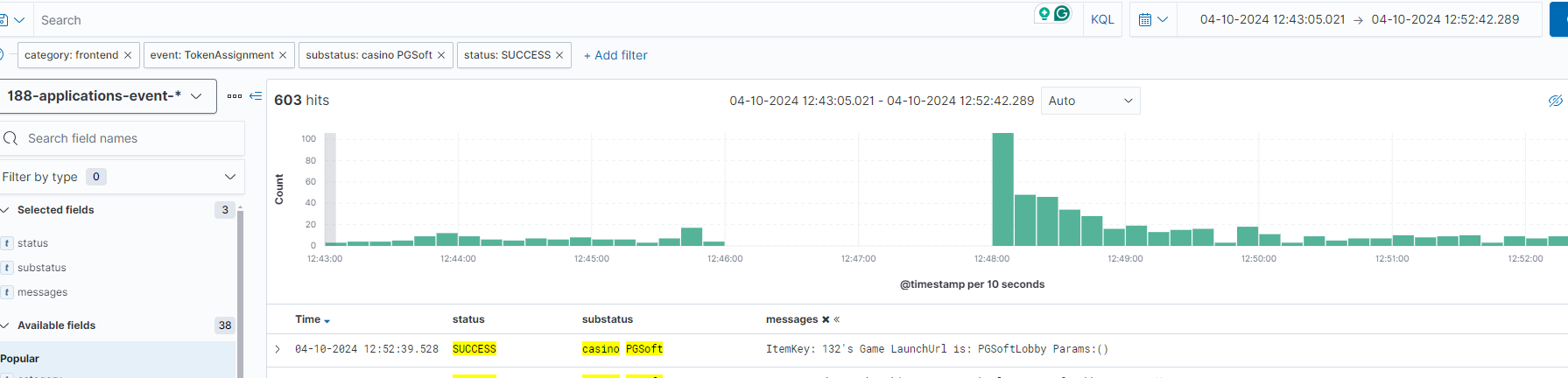
從 Kibana 看實際資料 下圖為 Kibana 中查看 TokenAssignment 失敗事件的畫面,可以看到在特定時間段內失敗事件集中爆發的模式:
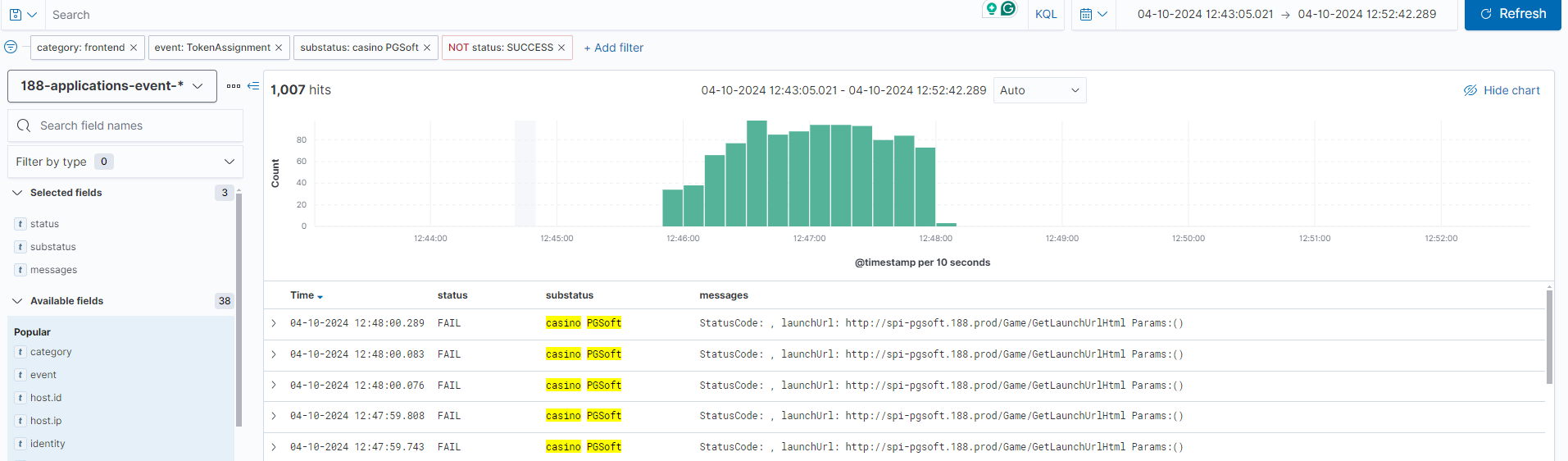
下圖顯示失敗的詳細 Log 記錄,包含 substatus(Provider)和具體 message 欄位,可以清楚看出是哪個 Provider 出問題:
Watcher 設定 1 2 3 4 5 6 7 8 9 10 11 12 13 14 15 16 17 18 19 20 21 22 23 24 25 26 27 28 29 30 31 32 33 34 35 36 37 38 39 40 41 42 43 44 45 46 47 48 49 50 51 52 53 54 55 56 57 58 59 60 61 62 63 64 65 66 67 68 69 70 71 72 73 74 75 76 77 78 79 80 81 82 83 84 85 { "trigger" : { "schedule" : { "interval" : "10m" } } , "input" : { "search" : { "request" : { "search_type" : "query_then_fetch" , "indices" : [ "applications-event*" ] , "rest_total_hits_as_int" : true , "body" : { "query" : { "bool" : { "filter" : [ { "term" : { "category" : "frontend" } } , { "range" : { "@timestamp" : { "gte" : "now-10m" } } } , { "terms" : { "event.keyword" : [ "TokenAssignment" ] } } ] } } , "size" : 0 , "aggs" : { "by_module" : { "terms" : { "field" : "module.keyword" , "size" : 10 } , "aggs" : { "by_event" : { "terms" : { "field" : "substatus.keyword" , "size" : 100 } , "aggs" : { "failed_status" : { "filter" : { "term" : { "status.keyword" : "FAIL" } } , "aggs" : { "failed_count" : { "value_count" : { "field" : "status.keyword" } } } } , "total_status" : { "value_count" : { "field" : "status.keyword" } } , "failure_rate" : { "bucket_script" : { "buckets_path" : { "failed" : "failed_status.failed_count" , "total" : "total_status" } , "script" : "if (params.total > 0) { return params.failed / params.total * 100 } else { return 0 }" } } } } } } } } } } } , "condition" : { "script" : { "source" : "return ctx.payload.aggregations.by_module.buckets.stream().flatMap(module -> module.by_event.buckets.stream()).anyMatch(event -> event.failure_rate.value > 30);" , "lang" : "painless" } } , "transform" : { "script" : { "source" : "String emailBody = '<table border=\"1\"><tr><th>Module</th><th>Product Partner</th><th>Failure Rate</th><th>Total Count</th><th>Failed Count</th></tr>'; for (def module : ctx.payload.aggregations.by_module.buckets) { for (def event : module.by_event.buckets) { if ((double)event.failure_rate.value > 5) { emailBody += '<tr><td>' + module.key + '</td><td>' + event.key + '</td><td>' + event.failure_rate.value + '%</td><td>' + event.total_status.value + '</td><td>' + event.failed_status.doc_count + '</td></tr>'; } } } emailBody += '</table>'; return ['email_body': emailBody];" , "lang" : "painless" } } , "actions" : { "send_email" : { "email" : { "profile" : "standard" , "to" : [ "team@example.com" ] , "subject" : "[Alert] Game Launch Event Failed Over 30% - Please Check" , "body" : { "html" : "{{ctx.payload.email_body}}" } } } } , "throttle_period_in_millis" : 600000 }
聚合邏輯拆解 這個查詢使用了三層巢狀聚合搭配 bucket_script:
第一層 — by_module:依產品模組分組第二層 — by_event:依 Provider(substatus)分組第三層 — 同時計算 failed_count(FAIL 筆數)和 total_status(總筆數)bucket_script — 在每個 bucket 內即時算出 failure_rate = failed / total * 100
Condition 使用 Java Stream 遍歷所有 bucket,只要任一組的 failure_rate 超過 30% 就觸發告警。
Watcher 5:Error Log 成長率監控 監控目的 偵測部署後或異常情況下,Error Log 是否突然暴增。這個 Watcher 會比較「最近 15 分鐘」和「前 15~30 分鐘」的錯誤數量,如果某個 Logger 的錯誤成長率超過 20% 且 數量達到 50 筆以上,就發出告警。
適用場景:
部署後 — 新版本引入了 Bug,Error Log 開始飆升被攻擊 — 異常請求導致大量錯誤Provider 故障 — 第三方服務異常導致錯誤集中爆發
觸發條件
項目
設定
執行頻率
每 15 分鐘
查詢範圍
過去 30 分鐘的 applications-error*
篩選條件
category=frontend,排除已知噪音 Logger
比較方式
將 30 分鐘切為兩段(1530 min vs 015 min),逐 Logger 比較
告警門檻
成長率 >= 20% 且 最近 15 分鐘的錯誤數 >= 50
冷卻時間
15 分鐘
比較邏輯 flowchart TD
A["查詢過去 30 分鐘 Error Log"] --> B["切分兩個時間段"]
B --> C["前 15~30 分鐘
Watcher 設定 1 2 3 4 5 6 7 8 9 10 11 12 13 14 15 16 17 18 19 20 21 22 23 24 25 26 27 28 29 30 31 32 33 34 35 36 37 38 39 40 41 42 43 44 45 46 47 48 49 50 51 52 53 54 55 56 57 58 59 60 61 62 63 64 65 66 67 68 69 { "trigger" : { "schedule" : { "interval" : "15m" } } , "input" : { "search" : { "request" : { "search_type" : "query_then_fetch" , "indices" : [ "applications-error*" ] , "rest_total_hits_as_int" : true , "body" : { "query" : { "bool" : { "filter" : [ { "term" : { "category" : "frontend" } } , { "range" : { "@timestamp" : { "gte" : "now-30m" } } } ] , "must_not" : [ { "terms" : { "logger.keyword" : [ "Seo.Prerender.SeoHttpModule" ] } } ] } } , "aggs" : { "intervals" : { "date_range" : { "field" : "@timestamp" , "ranges" : [ { "from" : "now-30m/m" , "to" : "now-15m/m" } , { "from" : "now-15m/m" , "to" : "now/m" } ] } , "aggs" : { "by_module" : { "terms" : { "field" : "module.keyword" , "size" : 10 } , "aggs" : { "by_logger" : { "terms" : { "field" : "logger.keyword" , "size" : 100 } } } } } } } } } } } , "condition" : { "script" : { "source" : "boolean alert = false; String message = '<table style=\"border:3px #cccccc solid;\" cellpadding=\"10\" border=\"1\"><tr><th>Module</th><th>Logger</th><th>Previous Count</th><th>Current Count</th><th>Previous Rate</th><th>Current Rate</th></tr>'; Map previousSource = new HashMap(); def previousBucket = ctx.payload.aggregations.intervals.buckets[0]; for (def moduleBucket : previousBucket.by_module.buckets) { for (def loggerBucket : moduleBucket.by_logger.buckets) { previousSource.put(moduleBucket.key + '#' + loggerBucket.key, loggerBucket.doc_count); } } def currentBucket = ctx.payload.aggregations.intervals.buckets[1]; for (def moduleBucket : currentBucket.by_module.buckets) { for (def loggerBucket : moduleBucket.by_logger.buckets) { String key = moduleBucket.key + '#' + loggerBucket.key; if (previousSource.containsKey(key)) { double previousCount = previousSource.get(key); double totalCount = previousCount + loggerBucket.doc_count; double preRate = (totalCount > 0) ? (previousCount / totalCount * 100) : 0; double currRate = (totalCount > 0) ? (loggerBucket.doc_count / totalCount * 100) : 0; if(currRate - preRate >= 20 && loggerBucket.doc_count >= 50){ alert = true; message += '<tr><td>' + moduleBucket.key + '</td><td>' + loggerBucket.key + '</td><td>' + previousCount + '</td><td>' + loggerBucket.doc_count + '</td><td>' + Math.round(preRate * 100.0) / 100.0 + '%</td><td>' + Math.round(currRate * 100.0) / 100.0 + '%</td></tr>'; } } else if(loggerBucket.doc_count >= 50) { alert = true; } } } message += '</table>'; if (alert) { ctx.vars.message = message; } return alert;" , "lang" : "painless" } } , "actions" : { "send_email" : { "email" : { "profile" : "standard" , "to" : [ "team@example.com" ] , "subject" : "[Alert] Error Rate Growth Over 20% - Last 15 mins vs Previous 15-30 mins" , "body" : { "html" : "Error Log growth detected. Events in the last 15 mins that increased by more than 20% and occurred over 50 times are listed below.<br>{{ctx.vars.message}}<br>Please check the Dashboard for more details." } } } } , "throttle_period_in_millis" : 900000 }
Condition 邏輯拆解 這個 Watcher 的 Condition 做了比較複雜的跨時間段比較:
建立基準 :遍歷前 15~30 分鐘的資料,建立 Module#Logger → Count 的 HashMap逐一比較 :遍歷最近 15 分鐘的每個 Logger,從 HashMap 中找出同一個 Logger 的前期數量計算佔比 :currRate = current / (previous + current) * 100判斷門檻 :成長率差距 >= 20% 且 最近 15 分鐘的數量 >= 50 才告警新出現的 Logger :如果前期完全沒有出現過但最近 15 分鐘 >= 50 筆,也觸發告警
告警信範例 收到的告警信會包含一個 HTML 表格:
Module
Logger
Previous Count
Current Count
Previous Rate
Current Rate
sportsbook
GameService.LaunchHandler
20
85
19.05%
80.95%
casino
SlotProvider.TokenService
15
62
19.48%
80.52%
Watcher 1~5 的定位比較 quadrantChart
title Watcher 分佈:監控廣度 vs 反應速度
x-axis "廣度:特定事件" --> "廣度:全體事件"
y-axis "速度:較慢(30 分鐘)" --> "速度:較快(10 分鐘)"
W4 Game Launch: [0.1, 0.95]
W3 Event成長率: [0.6, 0.7]
W5 Error成長率: [0.5, 0.65]
W2 Security: [0.15, 0.3]
W1 Main Event: [0.9, 0.2]
面向
W1 Main Event
W2 Security
W3 Event 成長率
W4 Game Launch
W5 Error 成長率
監控對象
所有業務事件
Security 事件
所有業務事件
TokenAssignment
Error Log
偵測方式
絕對值失敗率
絕對值失敗率
相對值成長率
絕對值失敗率
相對值成長率
執行頻率
30 分鐘
30 分鐘
15 分鐘
10 分鐘
15 分鐘
告警門檻
> 5%
> 5%
成長 > 5%
> 30%
成長 >= 20% 且 >= 50 筆
適用場景
整體事件異常
帳號/安全攻擊
特定事件惡化趨勢
Provider 故障
部署 Bug、被攻擊
分群維度
Module → Event
Module → SubStatus
Module → Event
Module → Provider
Module → Logger
結語 Elasticsearch Watcher 的優勢在於查詢和告警邏輯都在 Elasticsearch 內部執行,不需要額外部署監控服務。搭配 Painless Script 的靈活性,可以實作出複雜的聚合比較邏輯——從簡單的失敗率計算到跨時間段的成長率比較。
五個 Watcher 的設計思路彼此互補:
flowchart LR
A["問題發生"] --> B{"問題類型"}
B -->|"特定 Provider 遊戲無法啟動"| W4["W4 Game Launch
設計告警規則時的幾個關鍵思考:
門檻不要太敏感 :設定最低數量門檻(如 50 筆)避免低流量時的假警報加上 Throttle 冷卻 :避免同一個問題在短時間內連續觸發大量告警信排除已知噪音 :用 must_not 過濾掉已知的無害 Logger/Event,減少干擾絕對值 + 相對值雙覆蓋 :單純看失敗率會錯過緩慢惡化的問題;加上成長率比較可以更早發現趨勢告警信要有足夠資訊 :附上 Module、Event/Logger、數量和比率,讓收信者能快速判斷嚴重程度