本文介紹 Xuenn.Trigger.EventSPI 這個早期的 Cache 清除機制:呼叫端(資料修改端)透過傳遞 account id 與 topic,通知此服務對 Redis 中相關的 CacheState key 執行失效處理。
1. 背景與設計思路
在早期系統設計中,Cache 的失效策略採用「事件通知 + 主動清除」的方式:
- 資料修改完成後,呼叫端發送一個包含 account id 的 TopicMessage 到 RabbitMQ
- Topic 格式帶有事件類型(如
DPTransStatus、WDTransStatus),讓下游知道是哪類資料變動 - EventSPI 作為 Cache 清除的中間層,訂閱這些 Topic,依規則對 Redis 的 CacheState key 執行 ExpireKey
這屬於間接清除的做法——呼叫端不需要知道哪些 Redis key 存在,由 EventSPI 統一管理對應關係。
2. 系統架構總覽
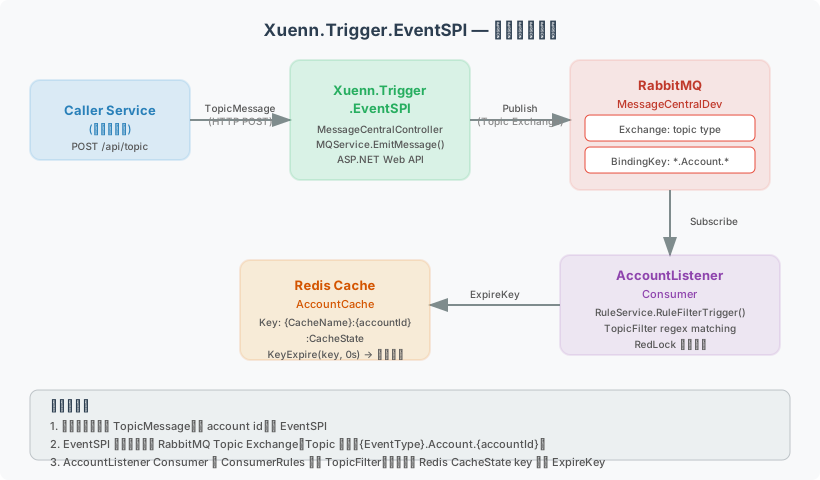
| 元件 | 說明 |
|---|---|
| Caller Service | 資料修改端,發送 TopicMessage(含 account id)至 EventSPI |
| EventSPI | ASP.NET Web API,接收請求並 Publish 訊息至 RabbitMQ |
| RabbitMQ | Topic Exchange(MessageCentralDev),依 BindingKey 路由訊息 |
| AccountListener | Consumer,訂閱 *.Account.* pattern,依 ConsumerRules 執行 |
| Redis Cache | 儲存 {CacheName}:{accountId}:CacheState key,失效後觸發 re-fetch |
3. Topic 命名規則與 Cache Key 對應
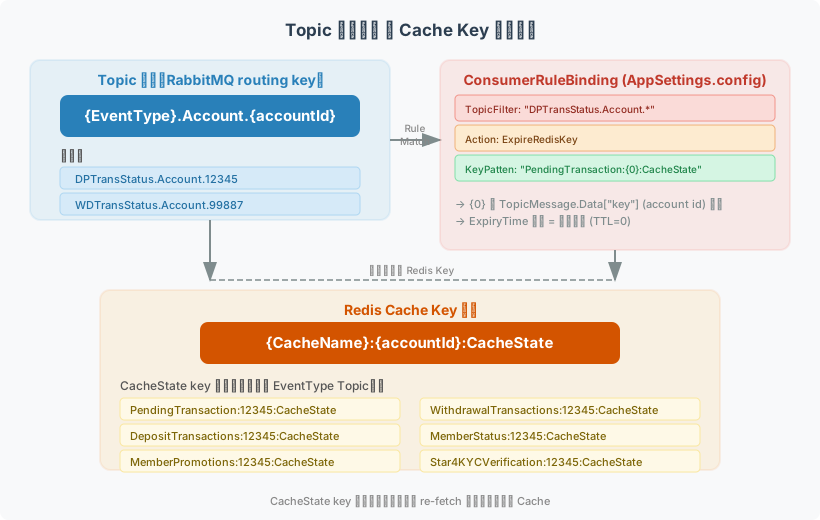
3.1 Topic 格式
1 | {EventType}.Account.{accountId} |
範例:
| Topic | 意義 |
|---|---|
DPTransStatus.Account.12345 |
帳號 12345 的存款交易狀態變動 |
WDTransStatus.Account.12345 |
帳號 12345 的提款交易狀態變動 |
KYCDocStatus.Account.12345 |
帳號 12345 的 KYC 文件狀態變動 |
MemberStatus.Account.12345 |
帳號 12345 的會員狀態變動 |
PromoStatus.Account.12345 |
帳號 12345 的促銷狀態變動 |
MemberLogout.Account.12345 |
帳號 12345 登出 |
3.2 TopicMessage 資料結構
1 | public class TopicMessage |
3.3 Redis Cache Key 格式
1 | {CacheName}:{accountId}:CacheState |
範例(對應不同 Topic):
1 | PendingTransaction:12345:CacheState |
設計慣例:key 加上
:CacheState後綴,表示這是快取狀態控制 key,CacheData為實際資料 key(由其他服務管理)。
4. 完整流程說明(Sequence Diagram)
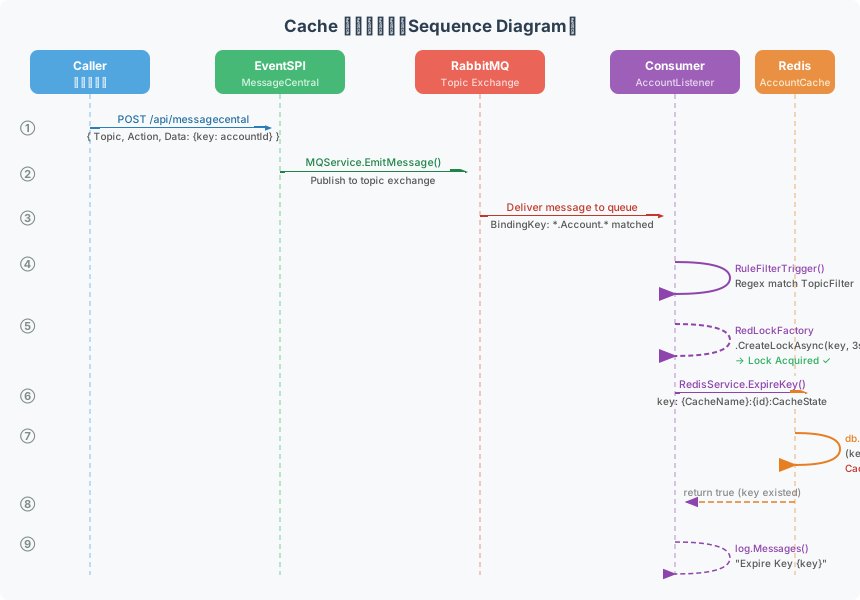
步驟說明
| 步驟 | 元件 | 動作 |
|---|---|---|
| ① | Caller → EventSPI | HTTP POST /api/messagecental,帶入 { Topic, Action, Data: {key: accountId} } |
| ② | EventSPI → RabbitMQ | MQService.EmitMessage() 將訊息 Publish 至 Topic Exchange |
| ③ | RabbitMQ → Consumer | BindingKey *.Account.* 匹配,訊息投遞至 AccountListener Queue |
| ④ | Consumer 內部 | RuleService.RuleFilterTrigger() 依 TopicFilter Regex 比對規則 |
| ⑤ | Consumer 內部 | RedLockFactory.CreateLockAsync() 取得分散式鎖(避免並發重複執行) |
| ⑥ | Consumer → Redis | 呼叫 RedisService.ExpireKey() |
| ⑦ | Redis 內部 | db.KeyExpire(key, TTL=0) → CacheState key 立即失效 |
| ⑧ | Redis → Consumer | 回傳 true(key 存在已失效)或 false(key 不存在) |
| ⑨ | Consumer 內部 | log.Messages() 記錄操作結果 |
5. 核心實作程式碼
5.1 發送端 — MessageCentralController
呼叫端透過此 API 傳入 TopicMessage:
1 | // Controllers/MessageCentralController.cs |
5.2 MQService — 發佈到 RabbitMQ
1 | // Utility/MQService.cs |
5.3 Consumer 啟動 — Global.asax.cs
應用程式啟動時初始化 Consumer:
1 | // Global.asax.cs — SetUpConsumer() |
5.4 RuleService — 規則比對與 Redis 操作
1 | // Utility/RuleService.cs |
5.5 RedisService.ExpireKey — 實際清除
1 | // Utility/RedisService.cs |
6. 設定檔(AppSettings.config)
所有 Consumer / Producer / Rule 的對應關係都定義在 Configuration/AppSettings.config:
1 | <!-- RabbitMQ Consumer 訂閱設定 --> |
Count=”4” 表示同時啟動 4 個 Consumer 並行消費,提升處理吞吐量。
7. 分散式鎖(RedLock)機制
在 MQService.ConsumeMessage() 的直接清除路徑中,使用 RedLock 防止並發競爭:
1 | using (var redLock = RedisService.RedisLockFactory |
8. 各 Topic 對應的 Cache Key 清除清單
| Topic (EventType) | 會被清除的 Cache Key Pattern |
|---|---|
DPTransStatus.Account.* |
PendingTransaction:{id}:CacheState、PaymentInfo:{id}:CacheState、DepositTransactions:{id}:CacheState |
WDTransStatus.Account.* |
PendingTransaction:{id}:CacheState、PaymentInfo:{id}:CacheState、WithdrawalTransactions:{id}:CacheState |
KYCDocStatus.Account.* |
Star4KYCVerification:{id}:CacheState、MemberStatus:{id}:CacheState、MemeberKYCDocsStatus:{id}:CacheState |
MemberStatus.Account.* |
MemberStatus:{id}:CacheState |
ProfileVerification.Account.* |
Star4KYCVerification:{id}:CacheState |
PromoStatus.Account.* |
MemberPromotions:{id}:CacheState (TTL 1min)、QualifyingPromotions:{id}:CacheState (TTL 1min)、PromotionClaims:{id}:CacheState、MemberRewards:{id}:CacheState |
MemberLogout.Account.* |
TradingSession:{id}:CacheState、ProfileSession:{id}:CacheState |
Notifications.Account.* |
多個 Notification 相關 key |
LoginProtection.Account.* |
SuspiciousLogin:ForgotAccount:{id} |
IpTraces.Account.* |
AddToRedis: Iptrace:{id}(TTL 43200 min) |
SignupComplete.Account.* |
Log + MemberStatus:{id}:CacheState |
PreferLanguage.Account.* |
PendingTransaction、KYC、Deposit/Withdrawal、Promotion 等多個 key |
9. 這個設計的特點與限制
優點
- 呼叫端解耦:資料修改端只需傳送 accountId + topic,不需知道 Redis key 的命名細節
- 彈性設定:新增/修改 Cache 清除規則只需改
AppSettings.config,不需改程式碼 - 集中管理:所有 Cache 失效邏輯集中在 EventSPI,容易追蹤
限制(早期設計的取捨)
- Topic 僅攜帶 accountId(
Data["key"]),無法針對更細粒度的資料(如單筆交易 id)做精確清除 - 以 CacheState key 間接觸發失效,實際 CacheData 由其他讀取服務自行重建,需搭配對應的 Cache 讀取機制
- Consumer 並發數固定在設定檔(
Count),無動態擴縮能力
此架構為早期設計,後續系統可考慮使用更精細的 Cache Tag / Cache Dependency 機制取代 Topic+accountId 的粗粒度清除方式。